Best Flight Simulators & Equipment Money Can Buy

Non-pilots may view flight simulators as nothing more than glorified video games, but serious pilots recognize and appreciate the value of the hands-on training opportunity. With flight time at a premium, the ability to build instrument flight rules (IFR) hands-on skills from home can be a powerful career-boosting asset.


By Neil Glazer
15 min read

Best Flight Simulators & Equipment Money Can Buy

Featured Pilot Gear

View Pilot Supplies

Non-pilots see flight simulators as glorified video games. Pilots know better: a good home sim setup is the cheapest flight time you will ever buy. With avgas and rental rates where they are in 2026, an at-home simulator is how you keep flows, scan discipline, radio work, and instrument procedures sharp between real flights.

This guide covers the best flight simulator equipment you can buy right now: complete bundles, yoke and HOTAS control systems, rudder pedals, and panels, evaluated against what actually matters for training transfer. Every product below is in the current Pilot Mall lineup with verified links. If you want a deeper head-to-head on individual controls, pair this with our guide to the best flight simulator yokes, pedals, and controls.

Key Takeaways

  • A home simulator is a proficiency tool, not loggable time: it builds flows, scan discipline, and IFR procedure habits, but consumer hardware does not count toward FAA ratings or currency.
  • Build in order: primary controls and throttle first, rudder pedals second, panels third. Every step in that sequence improves your flying immediately.
  • Match the hardware to the cockpit you fly: a yoke for GA and Boeing types, a sidestick for Airbus, a HOTAS for military aircraft and helicopters.
  • Xbox pilots must buy licensed hardware (Turtle Beach VelocityOne or Thrustmaster's X-series); PC pilots get the widest choice and the deepest upgrade path.
  • For control-by-control comparisons, see our companion flight simulator yokes and pedals guide; this page covers complete setups, bundles, and add-ons.

How to Choose a Home Flight Simulator

What components make up a home flight simulator?

A home flight simulator is scalable. You can start with a single yoke or stick and expand over time. A full setup includes:

  • Primary controls: a yoke, joystick, or sidestick. This is where control feel lives, so spend your first dollar here.
  • Throttle: integrated on most starter hardware, or a separate quadrant with detents on Airbus and Boeing replicas.
  • Rudder pedals: optional on day one, but the single biggest realism upgrade you can make.
  • Panels: radio, autopilot, and switch panels that build cockpit muscle memory and get your eyes off the mouse.
  • Software: Microsoft Flight Simulator 2024 is the current mainstream title, with X-Plane and DCS World serving IFR purists and military sim pilots respectively.

PC or Xbox: which platform should you build on?

PC gives you the widest hardware choice, every major sim title, and the deepest upgrade path into panels and enthusiast gear. Xbox gives you a fixed-cost machine that runs Microsoft Flight Simulator well with zero tuning, but it only accepts licensed controllers. If you already own a capable gaming PC, build there. If you do not and have no interest in maintaining one, the console route with VelocityOne or Thrustmaster X-series hardware is legitimate and far simpler than it was a few years ago.

Yoke, stick, or sidestick?

Buy the control format that matches the airplane you fly or plan to fly. Cessna and Piper drivers, and anyone pointed at Boeing equipment, should fly a yoke. Airbus-bound pilots and fly-by-wire fans want a sidestick. Military sim pilots, helicopter pilots, and bush flyers tend to prefer a conventional stick or HOTAS. If you just want general proficiency, either works; control feel transfers between aircraft far better than button layouts do.

How much realism do you actually need?

Be honest about your mission. A student pilot drilling flows and radio calls needs reliable primary controls, not a touchscreen HOTAS. An instrument pilot keeping an IFR scan sharp gets the most from pedals plus an autopilot panel. A weekend sim flyer chasing immersion can justify the enthusiast gear. The hardware below is organized so you can buy once at the right tier instead of upgrading three times to get there.

Flight Sim Hardware Comparison Table

Model Type Platforms Best For
Logitech G Saitek Basic Flight Simulation Bundle Yoke + throttle + pedals + MSFS download PC Flying today with zero guesswork
Logitech G Saitek Pro Yoke Flight Bundle Yoke + 3-lever throttle + MSFS download PC GA and instrument training reps
Turtle Beach VelocityOne Flight Yoke + throttle control system Xbox, PC One premium do-it-all system
Thrustmaster T.Flight Full Kit X Stick + throttle + pedals Xbox, PC Cheapest complete stick-and-rudder cockpit
Thrustmaster HOTAS One MSFS Edition HOTAS stick + throttle Xbox, PC Budget stick flyers
Thrustmaster TCA Sidestick X Airbus Edition Airbus-replica sidestick Xbox, PC Airbus-style handling practice
Thrustmaster TCA Quadrant Airbus Edition Throttle quadrant add-on PC Adding real thrust detents to a sidestick rig
Thrustmaster TCA Yoke Boeing Edition Boeing-replica pendular yoke Xbox, PC Boeing-style yoke flying
Thrustmaster HOTAS Warthog Metal HOTAS stick + dual throttle PC Military sim and DCS enthusiasts
Thrustmaster SOL-R 4 HOTAS Modular HOTAS stick + throttle PC Current-generation precision with a built-in upgrade path
Turtle Beach VelocityOne Flightdeck HOTAS + integrated touch display PC Deep sim control without a panel stack

The Best Flight Simulator Setups of 2026

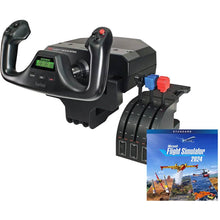
Logitech G Saitek Basic Flight Simulation Bundle with Microsoft Flight Simulator Standard Edition digital download for PC

Logitech G Saitek Basic Flight Simulation Bundle with Microsoft Flight Simulator (PC): open the box, go fly

Platform: PC. In the box: Pro Flight Yoke, three-lever Pro Flight Throttle, Pro Flight Rudder Pedals, and a Microsoft Flight Simulator Standard Edition digital download.

  • Stainless steel yoke shaft with smooth, predictable control travel
  • Software code included, so there is nothing else to buy before your first flight
  • USB plug-and-play with the sim's default control profile
Pros
  • the simplest, lowest-friction entry into yoke flying on PC; no compatibility homework, and the included rudder pedals mean real footwork from day one.
Watch-outs
  • PC only, and the included software is the Standard Edition, so heavy scenery chasers may upgrade later.

Perfect for: brand-new sim pilots who want to be flying a yoke tonight, not researching parts lists.

Click for Price →
Logitech G Saitek Pro Yoke Flight Bundle with three-lever throttle quadrant and Microsoft Flight Simulator download for PC

Logitech G Saitek Pro Yoke Flight Bundle with Microsoft Flight Simulator (PC): the GA training workhorse

Platform: PC. In the box: Pro Flight Yoke with built-in timer display, separate three-lever throttle quadrant, Microsoft Flight Simulator Standard Edition digital download.

  • Three-lever quadrant maps cleanly to throttle, prop, and mixture for piston GA work
  • Stainless steel yoke shaft and integrated timer for pattern and approach timing
  • Expands naturally into the Saitek pedal and panel ecosystem
Pros
  • the closest budget analog to a real GA power quadrant, which is exactly what student and instrument pilots should practice with.
Watch-outs
  • PC only, and the centering spring feel is lighter than a real aircraft's control loading.

Perfect for: student pilots and IFR students who want throttle-prop-mixture muscle memory on a budget.

Click for Price →
Turtle Beach VelocityOne Flight universal control system with yoke, throttle quadrant, and flight management display for Xbox and PC

Turtle Beach VelocityOne Flight Control System (Xbox, PC): one box, whole cockpit

Platforms: Xbox Series X and S, Xbox One, PC. Layout: 180-degree yoke, modular throttle quadrant, trim wheel, and integrated rudder controls in a single unit.

  • Precision magnetic sensors on the primary axes resist wear and dead zones
  • Flight Management Display shows real-time flight data on the unit itself
  • Modular quadrant adapts from light GA aircraft to airliners
Pros
  • the most complete single-purchase system for console pilots, and it moves with you if you later build a PC.
Watch-outs
  • built-in rudder rockers work, but dedicated pedals are still a meaningful upgrade.

Perfect for: Xbox pilots who want one premium system that covers yoke, throttle, and trim without a parts hunt.

Click for Price →
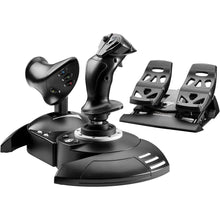
Thrustmaster T.Flight Full Kit X with joystick, detachable throttle, and rudder pedals for Xbox and PC

Thrustmaster T.Flight Full Kit X (Xbox, PC): the complete starter cockpit

Platforms: Xbox Series X and S, Xbox One, PC. In the box: T.Flight HOTAS One stick with detachable throttle plus T.Flight rudder pedals.

  • All three control groups (stick, throttle, rudder) in one purchase
  • 14 action buttons and 5 axes, recognized instantly by Microsoft Flight Simulator
  • Throttle detaches for desk setups or mounts for a compact single unit
Pros
  • the cheapest path to a full stick-and-rudder setup, and the pedals teach real footwork from day one.
Watch-outs
  • plastic construction throughout; serious sim pilots will outgrow the stick before the pedals.

Perfect for: casual sim pilots and students who want a complete cockpit on day one without going down the rabbit hole.

Click for Price →
Thrustmaster HOTAS One Microsoft Flight Simulator Edition stick and throttle for Xbox and PC

Thrustmaster HOTAS One Microsoft Flight Simulator Edition (Xbox, PC): budget stick flying done right

Platforms: Xbox Series X and S, Xbox One, PC. Layout: hands-on throttle and stick with a detachable throttle base.

  • Officially licensed for Microsoft Flight Simulator, with mapped-out-of-the-box controls
  • Dual rudder system: twist grip plus a rocker on the throttle
  • Compact footprint that suits a desk corner or couch flying
Pros
  • the easiest low-cost entry for stick flyers on console.
Watch-outs
  • twist-grip rudder builds a hand habit your feet will have to unlearn later; add pedals when you can.

Perfect for: helicopter, taildragger, and bush-flying fans who prefer a stick and want to spend the minimum to start.

Click for Price →
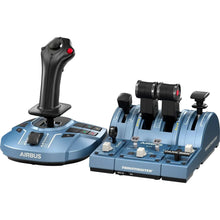
Thrustmaster TCA Sidestick X Airbus Edition replica sidestick for Xbox and PC

Thrustmaster TCA Sidestick X Airbus Edition (Xbox, PC): fly-by-wire feel at home

Platforms: Xbox Series X and S, Xbox One, PC. Layout: 1:1 scale officially licensed Airbus sidestick replica with integrated throttle.

  • True-to-scale Airbus grip geometry for transferable hand position
  • Integrated throttle axis with a thrust reverser function
  • Works as a standalone controller or the core of a growing Airbus rig
Pros
  • the most direct route to Airbus-style handling practice on either platform.
Watch-outs
  • yoke flyers should look elsewhere; this is purpose-built for sidestick technique.

Perfect for: airline-bound pilots and Airbus fans practicing sidestick finesse and fly-by-wire discipline.

Click for Price →
Thrustmaster TCA Quadrant Airbus Edition throttle quadrant with thrust detents for PC

Thrustmaster TCA Quadrant Airbus Edition (PC): real detents, real thrust discipline

Platform: PC. Layout: Airbus-replica twin-throttle quadrant with 2 axes and 16 buttons.

  • Physical detents for Idle, Climb, Flex, and TO/GA, just like the real thrust levers
  • H.E.A.R.T magnetic sensor technology for contactless, wear-free precision
  • Pairs with the TCA Sidestick to complete an Airbus-style pilot station
Pros
  • detent-based thrust management is a genuinely transferable airline habit, and nothing else at this level teaches it.
Watch-outs
  • PC only, and it assumes you already fly a sidestick.

Perfect for: sidestick owners ready to fly proper Airbus thrust procedures instead of a slider.

Click for Price →
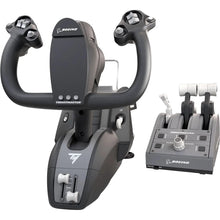
Thrustmaster TCA Yoke Boeing Edition pendular flight yoke for Xbox and PC

Thrustmaster TCA Yoke Boeing Edition (Xbox, PC): airliner yoke authenticity

Platforms: Xbox Series X and S, Xbox One, PC. Layout: officially licensed Boeing 787-inspired pendular yoke with a full metal internal mechanism.

  • Pendular design replicates the control geometry of a real Boeing column
  • Metal internals deliver smooth, consistent resistance across the full travel
  • Dual Boeing and Xbox licensing, so console pilots are not locked out
Pros
  • the most realistic Boeing-style yoke feel available in consumer hardware.
Watch-outs

Perfect for: pilots pointed at Boeing equipment, or yoke purists who want airliner-grade control feel.

Click for Price →
Thrustmaster HOTAS Warthog metal A-10C replica stick and dual throttle for PC

Thrustmaster HOTAS Warthog Stick and Throttle (PC): the enthusiast benchmark

Platform: PC. Layout: U.S. Air Force A-10C replica stick and dual-throttle system in metal construction.

  • Faithful A-10C Thunderbolt II control replica, down to button placement and throttle resistance
  • Metal build with the weight and damping to match
  • The long-standing standard for DCS World and serious military sim pilots
Pros
  • precision and build quality that consumer plastic cannot touch; it will outlast several PCs.
Watch-outs
  • no pedals included, and it is overkill if your mission is pattern work in a 172.

Perfect for: military sim enthusiasts and anyone who wants buy-once metal hardware for high-workload flying.

Click for Price →
Thrustmaster SOL-R 4 HOTAS advanced flight simulation system with ambidextrous stick and throttle for PC

Thrustmaster SOL-R 4 HOTAS Advanced Flight Simulation System (PC): the new-generation modular HOTAS

Platform: PC. Layout: ambidextrous joystick and customizable throttle with a removable grip and base built for Thrustmaster's interchangeable ecosystem.

  • H.E.A.R.T Hall-effect sensors on the X, Y, and Z axes deliver true 16-bit accuracy, so the smallest input produces a linear, proportional response
  • Up to 58 assignable actions across stick and throttle, with 21 action buttons on the grip alone, including two triggers, two hat switches, a mini-stick, and a thumbwheel
  • S.M.A.R.T sliding-rail throttle with 80 mm of smooth travel, and the grip and base interchange with other Thrustmaster grips such as the Viper and Hornet (sold separately)
Pros
  • this is Thrustmaster's newest HOTAS platform, so the precision is current-generation and the upgrade path is designed in from the start instead of bolted on.
Watch-outs
  • PC only and stick-format only, so yoke flyers should stay in the yoke section; Thrustmaster recommends pairing it with a compatible TFRP rudder system for footwork.

Perfect for: sim pilots who want Thrustmaster's latest stick-and-throttle precision in a system that grows instead of getting replaced.

Click for Price →
Turtle Beach VelocityOne Flightdeck HOTAS with integrated flight touch display for PC

Turtle Beach VelocityOne Flightdeck (PC): a HOTAS with its own glass

Platform: PC. Layout: stick and throttle system with an integrated Flight Touch Display.

  • Built-in touchscreen surfaces flight data and 39 additional virtual controls
  • Covers Microsoft Flight Simulator, DCS World, X-Plane, and more from one unit
  • Reduces keyboard reaching during high-workload phases
Pros
  • the touch display does the job of a small panel stack, which keeps a desk setup clean.
Watch-outs
  • stick-format only, and the learning curve is steeper than a basic HOTAS.

Perfect for: PC sim pilots who want panel-level control depth without buying and mounting separate panels.

Click for Price →

Rudder Pedals: The First Upgrade That Matters

If you already own primary controls, pedals are your next purchase, full stop. Coordinated turns, slips, crosswind technique, and every takeoff and landing depend on footwork that a twist grip cannot teach. We compare every pedal set in depth in the yokes, pedals, and controls guide; these are the three picks that cover most pilots.

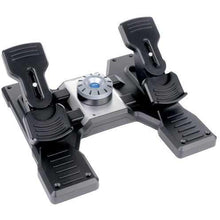
Logitech G Saitek Pro Flight Rudder Pedals with toe brakes for PC

Logitech G Saitek Pro Flight Rudder Pedals (PC): the default first pedals

Platform: PC. Adjustable tension system, differential toe brakes, self-centering action.

Perfect for: PC pilots adding footwork to a Saitek yoke setup at the lowest sensible cost.

Click for Price →
Turtle Beach VelocityOne Rudder universal rudder pedals with adjustable brakes for Xbox and PC

Turtle Beach VelocityOne Rudder Pedals (Xbox, PC): console-compatible footwork

Platforms: Xbox Series X and S, Xbox One, PC. Swappable pedal sets and adjustable brake tension to match aircraft type. On PC they connect direct over USB; on Xbox they must run through the VelocityOne Flight control system (sold separately) using the included pass-through cable.

Perfect for: VelocityOne Flight owners adding real rudder input on Xbox, and PC pilots connecting direct over USB.

Click for Price →
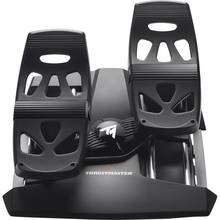
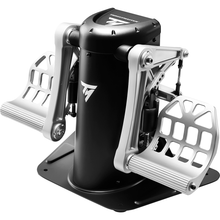
Thrustmaster TPR pendular rudder pedals with magnetic sensors for PC

Thrustmaster TPR Pendular Rudder Pedals (PC): the no-compromise pedals

Platform: PC. Pendular suspension design with contactless magnetic sensors for ultra-fine resolution.

Perfect for: enthusiasts pairing premium pedals with a Warthog or Boeing yoke rig.

Click for Price →

Flight Sim Panels and Add-Ons

Panels will not magically make you a better pilot, but they do something a mouse never will: they build "hands know where to go" habits. If you practice flows, IFR procedures, or autopilot management, these are worth the desk space. All three are PC, USB plug-and-play, and stack into a modular panel rack.

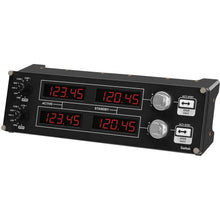
Logitech G Saitek Pro Flight Radio Panel with frequency displays for PC flight simulators

Logitech G Saitek Pro Flight Radio Panel (PC): hands-on com and nav

Dedicated physical control of com and nav frequencies, so radio work happens with your hands instead of a mouse cursor mid-approach.

Perfect for: IFR students drilling frequency management and radio flows.

Click for Price →
Logitech G Saitek Pro Flight Multi Panel with autopilot controls and trim wheel for PC flight simulators

Logitech G Saitek Pro Flight Multi Panel (PC): tactile autopilot control

Physical autopilot controls with LED readouts, precision dials, and an integrated trim wheel for real-time mode and altitude management.

Perfect for: instrument pilots keeping autopilot mode awareness sharp between flights.

Click for Price →
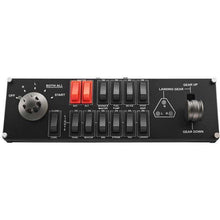
Logitech G Saitek Pro Flight Switch Panel with toggle switches and gear lever for PC flight simulators

Logitech G Saitek Pro Flight Switch Panel (PC): flows you can feel

A bank of physical switches, a rotary magneto and starter control, and a landing gear lever with LED status indicators for true tactile checklists.

Perfect for: pilots who run real checklists in the sim and want every flow to involve their hands.

Click for Price →

Recommended Upgrade Paths

Buy in an order where every purchase improves your flying immediately. Three proven builds:

Path 1: Student pilot and GA basics (PC)

Path 2: Console-first realism (Xbox, PC)

Path 3: Airbus training vibe

Frequently Asked Questions

What is the best flight simulator setup for beginners?
Start with a yoke or stick that includes a throttle, plus the sim software itself, and fly that combination until your hands know it. A bundle such as the Logitech G Saitek Basic Flight Simulation Bundle gets PC pilots airborne the day the box arrives, with no compatibility guesswork. Resist the urge to buy a full panel stack on day one. Add rudder pedals once you are flying regularly, then panels if you want deeper procedure work. A simple setup you fly three times a week beats an elaborate rig that gathers dust.
Do I need rudder pedals for a realistic home simulator?
You can start without them, but pedals are the upgrade you will feel on every single flight. Crosswind landings, slips, coordinated turns, and taxiing all depend on rudder input, and a twist-grip stick teaches your hands a motion your feet will never make in a real airplane. The Turtle Beach VelocityOne Rudder pedals cover both platforms: direct USB on PC, while Xbox use means connecting them through the VelocityOne Flight control system with the included pass-through cable. Whatever you choose, brace the pedals against a wall or use a non-slip mat so they stay planted during firm braking.
What flight sim hardware works with Microsoft Flight Simulator 2024 on Xbox?
Only officially licensed Xbox hardware connects to the console, so check for Xbox Series X and S compatibility before you buy. PC-only controllers will not work on Xbox even with adapters. The Turtle Beach VelocityOne Flight control system is the most complete single-box option for console pilots, and Thrustmaster's X-series line covers sticks, sidesticks, and yokes at lower cost. Everything in this guide lists its supported platforms, so match the label to your machine and you will not get burned.
Is a yoke or a joystick better for flight training?
Match the hardware to the cockpit you fly or plan to fly. If you train in a Cessna, a Piper, or anything else with a control wheel, a yoke builds directly transferable muscle memory. If you fly Airbus equipment, aerobatic aircraft, helicopters, or military sims, a stick or sidestick is the honest match. If you just want general proficiency, scan discipline, workload management, and procedures, either works, and you should buy whichever you will fly more often. Control feel transfers; button layouts do not.
Are flight sim panels worth buying?
Yes, if you are practicing flows and procedures rather than just flying for fun. Dedicated radio, autopilot, and switch panels get your eyes off the mouse and put your hands on physical controls, which is exactly the habit you want in the airplane. The Logitech G Saitek Pro Flight Multi Panel is the one I would add first for instrument work, because hand-flying an approach while managing the autopilot by mouse teaches you nothing about the real workflow. Casual sim pilots can skip panels entirely and never miss them.
Can a home flight simulator count toward FAA flight time or currency?
Generally no. Consumer hardware, no matter how good, is not an FAA-approved aviation training device, so the hours are not loggable and do not count toward ratings or instrument currency. Credit requires an approved BATD or AATD, and most allowances also require an authorized instructor present. Treat your home sim as structured chair flying: procedures, flows, radio work, approach briefings, and scan discipline. That practice genuinely shows up in the airplane even though it never shows up in your logbook.
What kind of computer do I need for a home flight simulator?
More than you think for current titles, less than you fear for procedure practice. Microsoft Flight Simulator 2024 rewards a modern multi-core processor, a midrange or better graphics card, 32 GB of RAM, and a fast SSD, especially since it streams scenery. That said, if your goal is instrument procedures rather than scenery, older sims run well on modest machines. If you do not want to maintain a gaming PC at all, build on Xbox with licensed hardware and let the console handle performance.

About the author: Neil S. Glazer is a commercial pilot with multi-engine and instrument ratings and the founder of PilotMall.com. He has spent decades flying, testing, and selling the gear pilots rely on, and he uses home simulation the same way he recommends it to customers: as structured procedure practice between real flights.


Related Pilot Gear and Supporting Our Mission

If you enjoyed this article, please consider browsing our selection of high-quality pilot supplies! Your purchase directly supports our small business and helps us continue sharing valuable aviation content.

1 of 19

1 comment

je viens de dÃĐbuter des cours de vol sur Cesna 152. je cherche un simulateur avec les commandes standard couplÃĐ avec MFS 2020 afin de me familiariser avec les instruments. je possÃĻde un pc Asus ROG 17 gamer sur Windows 11 .pour un budget de 1400₮ que me conseillez vous ?

ziani

Leave a comment

Please note, comments need to be approved before they are published.