




-
 Vendor:Logitech G
Logitech G Saitek Basic Flight Simulation Bundle w/Microsoft Flight Simulator Standard Digital Download (PC)
Complete starter bundle: yoke, throttle, rudder pedals and software, a plug-and-play USB setup with 20 aircraft and 30 airports ready to fly right out of the box.
Regular price $389.99Sale price $389.99 Regular priceUnit price per$519.97 -
 Vendor:Logitech G
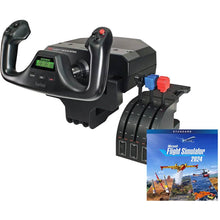
Logitech G Saitek Pro Yoke Flight Bundle w/Microsoft Flight Simulator Standard Digital Download (PC)
Yoke and throttle bundle with the sim to start flying today, a plug-and-play USB setup that includes 20 aircraft ready to explore from the first flight.
Regular price $229.99Sale price $229.99 Regular priceUnit price per$289.98

Frequently Asked Questions
What is included in a complete flight simulator package?
A complete flight simulator package from Pilot Mall includes flight controls and simulator software in one purchase. Both bundles pair Logitech G Saitek controls, a yoke and throttle quadrant (with rudder pedals on the Basic bundle), with Microsoft Flight Simulator Standard Edition as a digital download featuring 20 aircraft and 30 hand-crafted airports.
Are these flight simulator packages PC-compatible?
Yes. Both flight simulator packages on this page are PC-only and run on Windows computers that meet the Microsoft Flight Simulator system requirements, including a dedicated graphics card and sufficient RAM for smooth performance.
Should I choose the yoke bundle or the bundle with pedals?
Choose the Basic Flight Simulation Bundle if you want a complete setup out of the box with rudder pedals for full pitch, roll, and yaw control. Choose the Pro Yoke Flight Bundle if you want a lower entry point and plan to add rudder pedals later.
Do I need a powerful PC for a home flight simulator?
Yes. Microsoft Flight Simulator runs best on a PC with a modern multi-core processor, a dedicated graphics card, and ample RAM. Check the current Microsoft Flight Simulator system requirements before buying to ensure smooth frame rates and detailed scenery.
Can I use a flight simulator to practice for real flight training?
A home flight simulator is a valuable tool for drilling procedures, instrument scans, and pattern work between lessons, though these consumer packages are not FAA-approved training devices and do not log official flight time. Pair your setup with flight training resources to reinforce what you learn in the airplane.
No questions match your search. Try another term or ask our team.
