




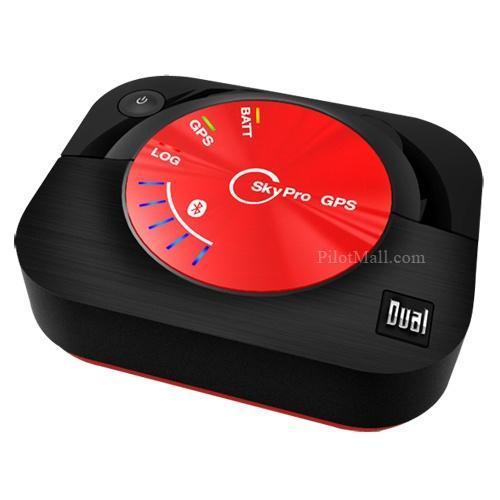
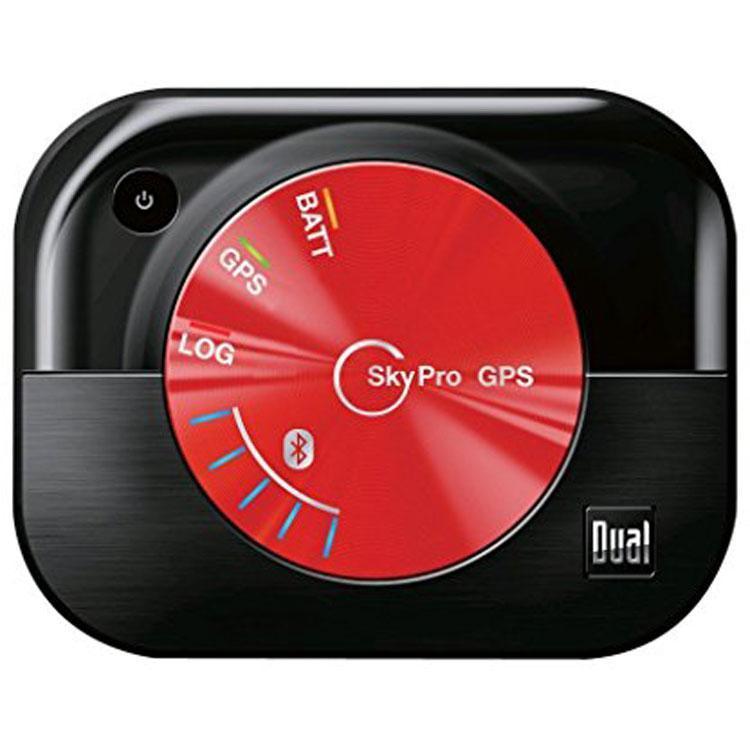
Dual Electronics SkyPro XGPS160: Receptor GPS de aviação multidispositivo
Portable Bluetooth GPS feeding tablet position, 10-hour battery, pairing with up to five Bluetooth devices at once for modern multi-tablet cockpit setups.
31338
Benefícios
Benefícios
Envio e Entrega
Envio e Entrega
Devoluções
Devoluções
Com seu SkyPro XGPS160, a Dual Electronics Corporation pega seu modelo XGPS150A altamente capaz e adiciona funcionalidades ainda mais inspiradoras. Ao contrário da grande maioria dos receptores GPS WAAS disponíveis comercialmente, esta unidade também é totalmente capaz de receber sinais de satélite GLONASS (versão russa do GPS). Além disso, enquanto o XGPS150A só pode se conectar sem fio a um dispositivo por vez, o SkyPro XGPS160 pode sincronizar simultaneamente com até 5 dispositivos habilitados para Bluetooth para uso múltiplo e independente. Além de tudo isso, a bateria interna da unidade agora dura mais de 10 horas por carga. O XGPS160 é uma unidade de 99 canais com uma taxa de atualização de posição de 10 vezes por segundo para informações de posição e movimento ultraprecisas e em tempo real. Como é baseado em satélite, você nunca estará à mercê das limitações de Wi-Fi ou 3G. Na verdade, o SkyPro fornece precisão posicional em qualquer lugar do globo - ele só precisa de uma visão desobstruída do céu! Mede apenas 0,87" x 2,2" x 2,75" e pesa apenas 2,6 onças. Também fornece gravação automática de rotas. Uma solução GPS incrivelmente capaz e extremamente compacta para todos os seus dispositivos habilitados para Bluetooth.
Frequently Asked Questions
Com quais dispositivos e aplicativos de aviação o SkyPro XGPS160 funciona?
O SkyPro XGPS160 se conecta via Bluetooth ao seu iPad, iPhone, tablet Android e outras ferramentas de navegação, sendo compatível com aplicativos de bolsa de voo eletrônica que aceitam um sinal GPS externo. Ele se conecta a até cinco dispositivos Bluetooth simultaneamente, permitindo que um piloto e um copiloto naveguem ou que você mantenha um dispositivo de backup sincronizado pronto.
O XGPS160 precisa de Wi-Fi ou serviço de celular para funcionar?
Não. O XGPS160 localiza sua posição diretamente dos satélites, portanto, nunca depende de Wi-Fi ou serviço de celular, mesmo em terrenos remotos ou espaço aéreo internacional. Isso o torna confiável longe da cobertura de celular. Para a recepção mais forte, coloque o receptor onde ele tenha uma visão clara do céu, em vez de guardado dentro de uma bolsa de voo fechada.
Quais sistemas de satélite o XGPS160 usa e qual sua precisão?
O XGPS160 é um receptor de 99 canais que utiliza as redes de satélite GPS e GLONASS e suporta WAAS para maior precisão. Essa abordagem de rede dupla oferece aquisição de sinal mais rápida e posicionamento mais forte em áreas remotas do que receptores que dependem apenas de GPS. Ele também atualiza sua posição dez vezes por segundo para um rastreamento suave e em tempo real.
O XGPS160 fornece informações meteorológicas ou de tráfego ADS-B e precisa de assinatura?
O XGPS160 é um receptor de posição GPS baseado em satélite. Suas características são posicionamento e registro automático de rotas, não informações meteorológicas ou de tráfego em voo, portanto, se você quiser informações meteorológicas ou de tráfego ADS-B, adicione um receptor ADS-B dedicado. Nada em sua operação requer uma assinatura mensal, pois ele determina a posição diretamente dos satélites.
Quanto tempo dura a bateria e precisa de energia externa?
A bateria interna recarregável oferece mais de dez horas de operação contínua por carga, o suficiente para longos voos cross-country e dias inteiros de voo. O receptor funciona com sua própria bateria e não consome energia do tablet ou telefone que exibe seus gráficos. Você o recarrega com uma fonte de alimentação USB padrão entre os voos ou durante a noite.
O XGPS160 esgota a bateria do meu tablet ou telefone?
Não. O XGPS160 fornece dados de posição de sua própria bateria interna e não consome energia do dispositivo que exibe seus gráficos, então seu tablet ou telefone fica livre para gerenciar sua própria autonomia. Como o receptor lida com o posicionamento de forma independente, seu dispositivo de exibição dura mais do que se estivesse usando um GPS interno durante um longo voo.
Quantos dispositivos podem se conectar ao XGPS160 ao mesmo tempo?
O XGPS160 se conecta a até cinco dispositivos habilitados para Bluetooth ao mesmo tempo. Você pode enviar dados de posição para vários tablets ou telefones de uma vez, permitindo que um piloto e um copiloto naveguem, ou que você mantenha um dispositivo primário e um de backup sincronizados. Não há necessidade de desemparelhar e emparelhar novamente os dispositivos entre os voos.
Como funciona o recurso de gravação automática de rota?
O XGPS160 pode registrar seu caminho de voo automaticamente para que você possa revisar a rota posteriormente. Você ativa ou desativa a gravação através dos controles do receptor ou de seu aplicativo complementar gratuito. O aplicativo complementar permite que você gerencie as configurações e trabalhe com suas viagens gravadas assim que o receptor estiver emparelhado, o que é útil para revisar uma rota ou geotag fotos posteriormente.
Como posso verificar quanta carga de bateria o XGPS160 ainda tem?
Emparelhe o receptor com seu aplicativo complementar gratuito e o aplicativo mostrará o nível atual da bateria em sua tela de status. Verificar o aplicativo antes da partida permite que você confirme que tem tempo de execução suficiente para o voo que se aproxima e decida se deve completar a carga primeiro. O carregamento é feito através de uma fonte de alimentação USB padrão entre os voos.
Quão portátil é o XGPS160 e quais são suas dimensões?
O XGPS160 é compacto e leve, medindo cerca de 0,87 por 2,2 por 2,75 polegadas e pesando aproximadamente 2,6 onças, então ele cabe facilmente em uma bolsa de voo ou bolso de camisa. Apesar de seu pequeno tamanho, ele oferece posicionamento durante todo o dia. Para a melhor recepção de satélite, coloque-o onde ele tenha uma visão aberta do céu.
-
 NovoFornecedor:Garmin
Smartwatch de Aviador Garmin D2 Mach 2 Pro - Titânio Carbon Gray DLC com Pulseira de Couro Chestnut
Smartwatch de aviador de alta qualidade com banco de dados de aviação e navegação com mapa móvel, construído com uma moldura de titânio de 51 mm e pulseira de couro para uso no cockpit e no dia a dia.
Preço normal $1,549.99Preço promocional $1,549.99 Preço normalPreço unitário por$1,549.99 -
 Fornecedor:Appareo
Receptor Portátil ADS-B Appareo Stratus 4 com Tela Touch Colorida e Bateria Substituível
Para aplicativos EFB: ADS-B portátil com informações meteorológicas, de tráfego e GPS WAAS, com tela touch colorida e a única bateria substituível pelo usuário em sua categoria.
Preço normal $849.00Preço promocional $849.00 Preço normalPreço unitário por -
 NovoFornecedor:Zoleo
Comunicador via Satélite ZOLEO (ZL1500) | Edição Limestone
Satellite SOS messenger with weather, IP68 waterproof housing and app texting, a flight bag-ready safety tool for GA pilots flying beyond cell coverage.
Preço normal $199.00Preço promocional $199.00 Preço normalPreço unitário por -
 Fornecedor:Garmin
Receptor de link de dados ADS-B portátil Garmin GDL 50 010-01561-00
Portable ADS-B receiver with free FIS-B weather and an 8-hour battery, adding a built-in GPS and backup attitude data to boost situational awareness in the cockpit.
Preço normal $850.00Preço promocional $850.00 Preço normalPreço unitário por$900.00 -
 NovoFornecedor:Garmin
Relógio inteligente Garmin D2 Mach 2 Aviator: Titânio DLC cinza carbono com pulseira de titânio ventilada (51 mm)
A rugged 51 mm DLC titanium case and sapphire lens protect a bright AMOLED display loaded with aviation databases and moving maps for pilots who accept zero compromise.
Preço normal $1,499.99Preço promocional $1,499.99 Preço normalPreço unitário por$1,499.99 -
 NovoFornecedor:Garmin
Relógio inteligente Garmin D2 Air X15 Aviator: Cinza-ardósia com pulseira de silicone preta
A 1.4 inch AMOLED touchscreen puts critical flight data on your wrist, with direct-to airport navigation and a durable silicone band built for daily wear in the cockpit.
Preço normal $649.99Preço promocional $649.99 Preço normalPreço unitário por$649.99 -
 NovoFornecedor:uAvionix
uAvionix skyBeacon ADS-B Out Luz de Navegação de LED para Ponta de Asa com GPS WAAS UAX-90032-01
Atualização ADS-B Out integrada a uma luz de navegação LED na ponta da asa, combinando um transmissor UAT de 978MHz com um receptor WAAS GPS para um caminho de conformidade minimamente invasivo.
Preço normal $2,199.00Preço promocional $2,199.00 Preço normalPreço unitário por -
 NovoFornecedor:uAvionix
uAvionix AV-30-E Experimental Display Digital Multifunções de 3 Polegadas UAX-90051-01
MFD experimental de 3 polegadas combinando atitude e navegação para aeronaves experimentais, substituindo medidores mecânicos e sistemas a vácuo antigos por layouts personalizáveis.
Preço normal $1,849.00Preço promocional $1,849.00 Preço normalPreço unitário por -
 PromoçãoFornecedor:Garmin
Receptor SiriusXM AHRS ADS-B portátil Garmin GDL 52: receptor de aviação tudo-em-um
Receptor ADS-B portátil com informações meteorológicas SiriusXM e AHRS integrado, transformando qualquer EFB em um display completo de informações de cabine para tráfego, terreno e atitude de backup.
Preço normal $1,360.00Preço promocional $1,360.00 Preço normalPreço unitário por$1,425.00 -
Fornecedor:Garmin
Receptores portáteis da série Garmin GDL: ADS-B e SiriusXM Weather & Traffic
Compacta e sem instalação fixa, esta série de receptores ADS-B transmite dados meteorológicos FIS-B ou dados completos SiriusXM para o seu iPad, iPhone ou navegador portátil.
Preço normal De $850.00Preço promocional De $850.00 Preço normalPreço unitário por$900.00


