




-
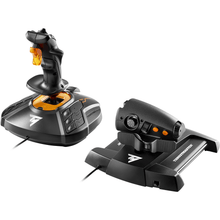 Out of StockVendor:Thrustmaster
Thrustmaster T.1600M FCS HOTAS (PC)
Ambidextrous HOTAS stick and throttle with magnetic sensors, a precise, customizable setup for pilots flying Microsoft Flight Simulator or other PC flight sims.
Regular price $169.99Sale price $169.99 Regular priceUnit price per -
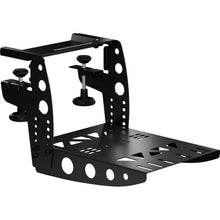 Out of StockVendor:Thrustmaster
Thrustmaster TM Flying Clamp
Desk clamp that locks flight sim controls to your table or rig, an all-metal mount built for TCA and T.16000M accessories to stay rock-solid through hard maneuvers.
Regular price $79.99Sale price $79.99 Regular priceUnit price per -
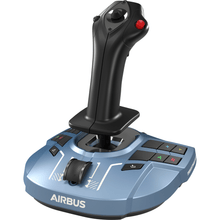 Vendor:Thrustmaster
Thrustmaster TCA Sidestick X Airbus Edition (Xbox Series X|S, One, PC)
Airbus-style sidestick for realistic airliner sim flying, an officially licensed 1:1 scale replica with 17 tactile action buttons for full control of aircraft systems.
Regular price $119.99Sale price $119.99 Regular priceUnit price per -
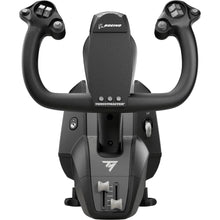 Out of StockVendor:Thrustmaster
Thrustmaster TCA Yoke Boeing Edition (Xbox Series X|S, One, PC)
Boeing-style airliner yoke for study-level airline simming, an officially licensed Boeing 787 replica built for pilots who want authentic heavy-jet hand-flying feel.
Regular price $399.99Sale price $399.99 Regular priceUnit price per -
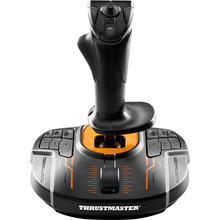 Out of StockVendor:Thrustmaster
Thrustmaster T.16000M FCS (PC)
Ambidextrous precision stick with magnetic Hall-effect sensors delivering 16,000-point precision, built for pilots who want smooth control in any PC flight sim.
Regular price $79.99Sale price $79.99 Regular priceUnit price per -
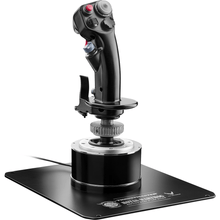 Out of StockVendor:Thrustmaster
Thrustmaster HOTAS Warthog Flight Stick (PC)
All-metal military flight stick modeled on Air Force A-10C controls, weighing over 6 pounds for the heft and stability serious combat sim pilots expect at the desk.
Regular price $279.99Sale price $279.99 Regular priceUnit price per -
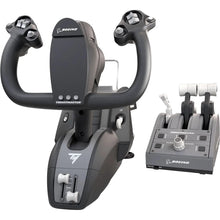 Vendor:Thrustmaster
Thrustmaster TCA Yoke Pack Boeing Edition (Xbox Series X|S, One, PC)
Boeing-style yoke and throttle quadrant for airliner sim flying, replicating full-scale 787 flight deck controls for authentic airliner procedures.
Regular price $499.99Sale price $499.99 Regular priceUnit price per -
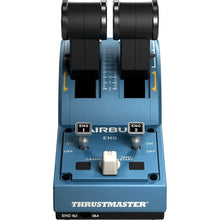 Vendor:Thrustmaster
Thrustmaster TCA Quadrant Airbus Edition (PC)
Airbus-style twin throttle quadrant with detents and 16 buttons, plus 2 navigational axes and true Idle, Climb, Flex, and TO/GA throttle stops for airliner sim realism.
Regular price $129.99Sale price $129.99 Regular priceUnit price per -
 NewVendor:Thrustmaster
Thrustmaster SOL-R 4 HOTAS - Advanced Flight Simulation System (PC)
An ambidextrous joystick and a robust throttle combine into an accessible HOTAS setup that gives everyday flight simmers precise, confident control without a steep price.
Regular price $339.99Sale price $339.99 Regular priceUnit price per$349.99

Frequently Asked Questions
What flight simulator controls work on a PC?
Almost all dedicated sim controls work on Windows PCs, including Logitech G (Saitek) yokes and panels, Thrustmaster yokes and HOTAS sticks, and Turtle Beach VelocityOne systems. They connect over USB and are plug-and-play with Microsoft Flight Simulator and X-Plane.
Should I get a yoke or a HOTAS for flight simming?
Choose a yoke if you mostly fly general aviation aircraft and airliners, since it matches the real control wheel. Choose a HOTAS stick and throttle if you fly jets, warbirds, or helicopters, where a center stick is more authentic and responsive.
What do I need to start flight simming on PC?
At minimum you need simulator software such as Microsoft Flight Simulator and one primary control, usually a yoke or a stick. Most pilots add rudder pedals next, then a throttle quadrant and instrument panels as they build out the cockpit.
Do these controls work with Microsoft Flight Simulator and X-Plane?
Yes. The PC controls in this collection are designed for Microsoft Flight Simulator and are also compatible with X-Plane and most other Windows flight sims. Each is recognized automatically, and bindings can be customized inside the simulator.
Can I add rudder pedals and panels later?
Yes. The Logitech G and Thrustmaster systems are modular, so you can start with a yoke or stick and add rudder pedals, a throttle quadrant, and instrument panels over time, each connecting by USB without replacing what you already own.
No questions match your search. Try another term or ask our team.
