



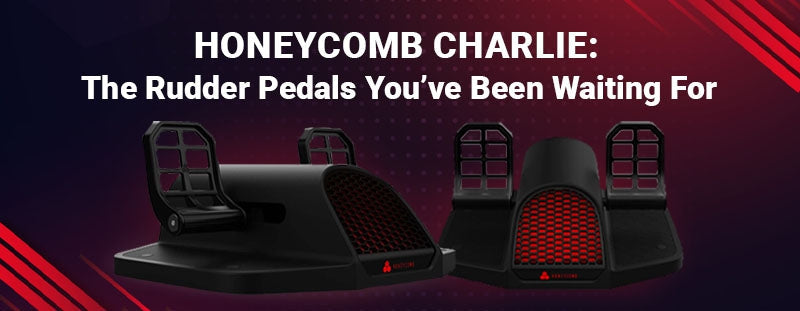
Honeycomb Charlie: The Rudder Pedals You’ve Been Waiting For
Quality flight sim hardware that doesn’t cost a fortune is at the top of many pilots’ gear wish lists. After all, flight time isn’t free. That’s why it simply makes sense to log hours of practice in the simulator so by the time we slide into the real-world cockpit, our muscle memory is there.


Quality flight sim hardware that does not cost a fortune is at the top of many pilots' gear wish lists. Flight time is not free, so it makes sense to log practice hours in the simulator, so that by the time you slide into the real-world cockpit your muscle memory is already there. Of all the controls you can add to a home sim, rudder pedals are one of the upgrades pilots feel the most, especially on takeoff, in crosswind landings, and during coordinated turns.
A lot of pilots first started shopping for sim pedals when Honeycomb Aeronautical teased the long-awaited Charlie rudder pedals. This guide covers what made the Charlie interesting, what actually matters in a good pedal set, and most importantly which rudder pedals you can buy and ship today for PC, Xbox, and PlayStation. Every pedal set we recommend is in stock and ready to ship from Pilot Mall's flight simulator equipment shelves.
Key Takeaways
- The Honeycomb Charlie never reached wide release, and Pilot Mall no longer carries the Honeycomb line, so do not plan a sim build around it.
- Rudder pedals are one of the biggest realism upgrades you can make to a home sim, paying off most in crosswind landings, coordinated turns, and taxi work.
- Platform decides your shortlist: PC has the widest support, while Xbox and PlayStation only recognize pedal sets explicitly licensed for the console. For PS5, see our guide to PS5 flight sim controls.
- The Logitech G Saitek Pro Flight Rudder Pedals are the best-value PC pick, and the Turtle Beach VelocityOne Precision is the Xbox standout.
- For maximum realism on PC, the Thrustmaster TPR's pendular mechanism and heavy metal build are the closest thing to a real rudder linkage underfoot.
Whatever Happened to the Honeycomb Charlie?
If you landed here searching for the Honeycomb Charlie rudder pedals, here is the honest status. Honeycomb Aeronautical generated a lot of excitement with the Charlie pedals after the success of its Alpha yoke and Bravo throttle quadrant. The Charlie was shown in prototype form at EAA AirVenture 2021 and again at AERO Friedrichshafen 2022, and it promised an all-metal pedal set with toe brakes, adjustable pedal angle, and a tension knob for adjustable feel.
Honeycomb's original goal, in founder Nicki's words, was "creating and providing affordable flight simulation hardware" while staying true to real cockpit designs, with mechanical engineering by Precision Flight Controls. It was a genuinely promising lineup. Pilot Mall no longer carries the Honeycomb Charlie pedals or the rest of the Honeycomb line, so rather than send you chasing a product you cannot buy, the rest of this guide focuses on the pedals you can actually order and fly today, including options that hit the same goals the Charlie was aiming for: real toe brakes, adjustable feel, and solid build quality at a sensible price.
How to Choose Flight Sim Rudder Pedals
Three questions settle the buying decision: do you actually need pedals, which features separate the good sets from the toys, and which platform do you fly on. The subsections below cover each, then the picks section matches you to a specific set. Want the full picture across yokes, sticks, throttles, and pedals? See our complete guide to the best flight simulator yokes, pedals, and controls.
Why Are Rudder Pedals Worth It?
You can fly a sim with a twist-grip stick or keyboard, but dedicated rudder pedals are one of the biggest realism upgrades you can make. Pedals give you proper yaw control and independent left and right toe brakes, which is exactly what you need for:
- Coordinated turns (keeping the ball centered instead of skidding or slipping)
- Crosswind takeoffs and landings, where rudder input keeps you tracking the centerline
- Ground steering and differential braking while taxiing
- Tailwheel and warbird practice, where footwork is constant
If you are training toward a real-world certificate, pedals build the foot habits that twist-grip controls simply cannot. That is the same reason instructors push students onto pedals early.
What Should You Look For in a Pedal Set?
The Charlie taught a lot of simmers what to look for in a pedal set. Use the same checklist when you compare the options below:
- Toe brakes: Independent left and right braking is essential for realistic taxi and landing rollout. Cheaper sets sometimes skip this.
- Build and materials: Heavier, metal-reinforced sets stay planted and last longer. Lighter plastic sets are fine for casual flying but can slide under heavy footwork.
- Adjustable tension and travel: Being able to tune how stiff and how far the pedals move helps you match real aircraft feel.
- Platform compatibility: PC has the widest support. If you fly on Xbox, you must choose a pedal set explicitly labeled Xbox-compatible.
- Stability: Plan for a non-slip mat or a brace so the pedals do not creep forward during the flare.
Which Pedal Set Matches Your Platform?
- Flying on PC and want the best value? Get the Logitech G Saitek Pro Flight Rudder Pedals.
- Flying on Xbox? Get the Turtle Beach VelocityOne Precision Rudder Pedals.
- Mixing PlayStation, Xbox, and PC? Get the Thrustmaster T.Flight Rudder Pedals.
- Building a high-end PC cockpit? Get the Thrustmaster TPR Pendular Rudder Pedals.
Still deciding on the rest of your setup (yoke vs stick, throttle, and panels)? Read our Turtle Beach VelocityOne vs Thrustmaster Boeing Yoke comparison for an all-in-one control system head-to-head.
Best Flight Sim Rudder Pedals: In-Stock Picks
Here are the rudder pedal sets we currently stock at a glance. Compare platform support and who each one is for, then click any model name to jump to its full review.
| Model | Platforms | Toe Brakes | Best For |
|---|---|---|---|
| Logitech G Saitek Pro Flight Rudder Pedals | PC | Yes | Best-value PC pedals (our best seller) |
| Turtle Beach VelocityOne Precision Rudder Pedals | Xbox Series X|S, Xbox One, PC | Yes (adjustable) | Best pedals for Xbox flyers |
| Thrustmaster T.Flight Rudder Pedals | PS5, PS4, Xbox Series X|S, Xbox One, PC | Yes | Most cross-platform option |
| Thrustmaster TPR Pendular Rudder Pedals | PC | Yes | Highest realism, premium build |

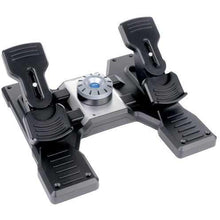
Logitech G Saitek Pro Flight Rudder Pedals
- Platforms: PC
- Toe brakes: Independent left and right
- Adjustment: Self-centering axis with adjustable damping
If you want the closest thing to the Charlie's "affordable but real" promise, this is it. The Logitech G Saitek Pro Flight Rudder Pedals are our best-selling pedal set for a reason: they deliver smooth rudder axis movement plus independent left and right toe brakes, a self-centering mechanism, and adjustable damping, all at a price that makes a quality PC setup accessible. Logitech G (formerly Saitek) is the same lineage Honeycomb's founder came from, so the heritage runs deep. Pair them with a yoke and throttle from the Logitech G (Saitek) flight sim controls collection for a full GA training rig.
- Smooth rudder travel you can tune to taste with the damping adjustment
- Differential toe braking for centerline work and realistic landing rollout
- Standard USB connection recognized by every major PC simulator
- Matches the rest of the Logitech G flight line for a coordinated cockpit
- Full toe-brake function, adjustable feel, and proven durability at the most accessible price on this list.
- This is the set I point most new sim pilots to first.
- PC only, and the lighter base can creep forward on hard floors under heavy footwork, so plan on a non-slip mat.
- If you are building an all-metal high-end cockpit, skip straight to the TPR below.
Perfect for PC pilots who want real toe brakes and adjustable feel at the lowest cost of entry.
Click for Price →
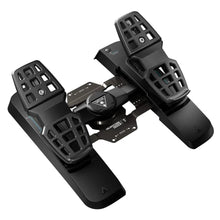
Turtle Beach VelocityOne Precision Rudder Pedals
- Platforms: Xbox Series X|S, Xbox One, PC
- Toe brakes: Yes, adjustable
- Licensing: Designed for Xbox
One thing the Charlie promised was Xbox support (via a hub). If you fly Microsoft Flight Simulator on Xbox Series X|S or Xbox One, the Turtle Beach VelocityOne Precision Rudder Pedals are the standout choice. They work natively on console and PC, include adjustable brakes, and bring real foot control to a platform that has historically been short on quality pedal options.
- Licensed console support with no hub or adapter workarounds required
- Brake resistance you can adjust to match your footwork
- Same set moves between the console and a Windows PC
- Slots into a VelocityOne yoke setup for a complete console cockpit
- The rare pedal set that gives console MSFS pilots genuine rudder and differential braking instead of thumbstick yaw.
- If you fly on PC only, part of what you are paying for is the Xbox licensing; the Saitek set above gives PC-only pilots more value for the money.
Perfect for Xbox Series X|S and Xbox One pilots who want real foot control in Microsoft Flight Simulator.
Click for Price →
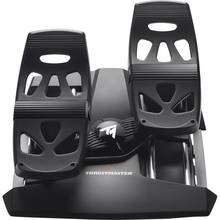
Thrustmaster T.Flight Rudder Pedals
- Platforms: PS5, PS4, Xbox Series X|S, Xbox One, PC
- Toe brakes: Yes
- Mechanism: Slide-rail rudder motion
If your setup spans PlayStation, Xbox, and PC, or you expect it to change, the Thrustmaster T.Flight Rudder Pedals offer the broadest compatibility on this list. They use a slide-rail rudder motion and include toe brakes, making them a practical, budget-conscious entry point that can follow you across systems. Browse the rest of the lineup in our Thrustmaster flight sim controls collection.
- Recognized on PS5, PS4, Xbox Series X|S, Xbox One, and Windows PC
- Toe braking included at an entry-level price band
- Compact and light enough to stow when the sim shares a room with the rest of life
- Pairs naturally with Thrustmaster sticks and yokes
- One purchase that keeps working if you switch consoles or migrate to PC later.
- The all-plastic build and shorter pedal travel will not match the feel of heavier sets.
- Dedicated PC-only simmers get more for their money with the Saitek or, at the high end, the TPR.
Perfect for pilots whose sim life spans PlayStation, Xbox, and PC and who want one pedal set for all of it.
Click for Price →
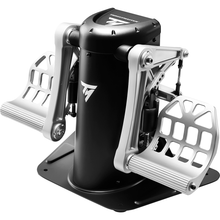
Thrustmaster TPR Pendular Rudder Pedals
- Platforms: PC
- Mechanism: Pendular (hanging) pedal action
- Build: Heavy metal frame with tunable tension
For pilots who want the most realistic rudder feel money can buy, the Thrustmaster TPR Pendular Rudder Pedals use a hanging, pendular mechanism that closely mimics real aircraft rudder action, with a heavy metal build and tunable tension. This is the premium choice for serious IFR practice, tailwheel work, and high-fidelity PC simulation, and it delivers the kind of mechanical quality the Charlie was reaching for. If I were building a dedicated PC sim room, this is the pedal set I would bolt to the floor first.
- Pendular mechanism swings each pedal through a realistic arc under load
- Mass and metal keep it planted without a mat or brace
- Adjustable tension and pedal angle to match real aircraft feel
- Contactless magnetic sensors hold their calibration over years of hard use
- The most authentic rudder motion on this list and build quality that ends the upgrade cycle.
- It is a premium investment, PC only, and heavy enough that you will want a permanent spot for it.
- Casual weekend flyers will be happier starting with an entry-level set.
Perfect for serious IFR practice, tailwheel work, and high-fidelity PC cockpits where realism is the whole point.
Click for Price →Want the Sim Included? Start with a Bundle
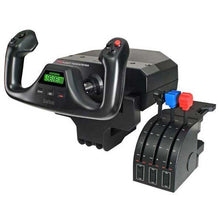
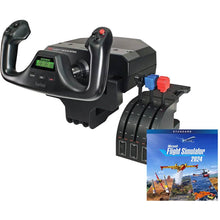
If you are building from scratch and want one box to get flying, our Microsoft Flight Simulator bundles pair controls with a copy of the sim. The Logitech G Saitek Basic Flight Simulation Bundle with Microsoft Flight Simulator is a popular all-in-one starting point, and you can add the matching Saitek rudder pedals above to complete the setup. Once you have a sim running, our guide to sharpening your skills in Microsoft Flight Simulator will help you put those new pedals to work.
Related Reading
Frequently Asked Questions
- Can I still buy the Honeycomb Charlie rudder pedals?
- No. Pilot Mall no longer carries the Honeycomb Charlie pedals or the rest of the Honeycomb line, so the Charlie is not something you can order today. Rather than wait on a discontinued product, pick a set that matches your platform: PC pilots should start with the Logitech G Saitek Pro Flight Rudder Pedals, and console flyers should choose a set explicitly licensed for Xbox or PlayStation. The comparison table in this guide matches each in-stock option to its platform.
- Are rudder pedals worth it for home flight simulation?
- Yes. Pedals are one of the biggest realism upgrades you can make. They improve takeoffs, crosswind landings, slips, coordinated turns, and ground handling. If you are training toward real-world flying, pedals build the foot habits a twist-grip stick cannot. That is the same reason flight instructors push students onto pedals early in their training.
- Which rudder pedals work with Microsoft Flight Simulator on Xbox?
- Only pedal sets explicitly labeled Xbox-compatible work on console; standard PC pedals are not recognized by an Xbox no matter how you connect them. The Turtle Beach VelocityOne Precision Rudder Pedals are the standout option, working natively on Xbox Series X/S, Xbox One, and Windows PC with adjustable brakes included. If you want the sim itself bundled with your hardware, Pilot Mall also offers Microsoft Flight Simulator bundles that get a complete setup flying in one box.
- What is the best budget rudder pedal set for PC?
- The best-selling Logitech G Saitek Pro Flight Rudder Pedals are the best value for PC pilots, with a smooth rudder axis, independent toe brakes, a self-centering mechanism, and adjustable damping at an accessible price. They connect over standard USB, so every major PC simulator recognizes them, and they pair naturally with a matching yoke and throttle quadrant if you grow your setup later.
- What is the difference between pendular and slide-rail rudder pedals?
- Pendular pedals hang each footrest from a pivot above your feet, so the pedals swing through an arc the way rudder pedals do in many real aircraft, which produces smoother, more progressive motion under load. Slide-rail pedals move along a horizontal track instead, a simpler and cheaper design that works well for casual flying. In this guide, the Thrustmaster TPR is the pendular option, while the entry-level sets use sliding or rocking motion. If realism is the priority and you fly on PC, pendular action is worth the premium.
- Will these rudder pedals work with MSFS 2024 and X-Plane?
- Yes, on PC. Every pedal set in this guide presents itself as a standard USB game controller on Windows, so Microsoft Flight Simulator 2020 and 2024, X-Plane 11 and 12, and most other PC simulators recognize them and let you assign rudder and toe-brake axes in the control settings. Consoles are stricter: only Xbox-licensed hardware works on Xbox, and only PlayStation-compatible hardware works on PS4 and PS5, so check the platform label before you buy.
- Do I need a special mat or stand for rudder pedals?
- It is not required, but highly recommended. A non-slip mat or a brace keeps the pedals from sliding forward during the flare or under heavy footwork, which improves control precision and consistency. Lighter plastic sets benefit the most, since they lack the weight to stay planted on hard floors, while heavy metal sets generally stay put on their own. Some simmers go further and bolt their pedals to a board or cockpit frame for a permanent fix.
- When should I upgrade to pendular pedals like the Thrustmaster TPR?
- Upgrade when your footwork outgrows your hardware. If you fly regular crosswind circuits, tailwheel aircraft, or serious IFR practice and you notice your entry-level pedals sliding, binding, or running out of travel, a pendular set with a heavy metal frame and tunable tension will hold calibration and feel consistent under aggressive inputs. If you fly casually a few hours a month, a quality entry-level set remains the smarter spend, and you can put the difference toward a yoke or throttle upgrade instead.
About the author: Neil S. Glazer is a commercial pilot with multi-engine and instrument ratings and the founder of PilotMall.com, where he has helped pilots outfit their aircraft and flight bags for over two decades.