The 10 Best Flight Simulator Yokes, Pedals & Controls (Updated for 2026)
We can’t all be in real-world cockpits every day, so the next best option is a personal flight simulator. Home flight simulator setups can be as basic as the simulator software paired with your existing computer keyboard and mouse although serious flyers typically include dedicated hardware components like yokes, throttle quadrants, and rudder pedals in their simulator configurations. It is all up to you.


Can't be in a real cockpit every day? A home flight simulator is the next best thing, especially when you pair your sim with realistic controls like a yoke or stick, throttle, and rudder pedals. The right hardware improves immersion, builds better muscle memory, and makes training sessions feel far closer to real-world flying, especially for takeoffs, landings, rudder work, and instrument scanning.
In this updated 2026 guide we answer the common buyer questions (PC vs Xbox, yoke vs joystick, pedals, panels, mounting, and compatibility), then give you a side-by-side comparison of our current lineup so you can pick the right setup and buy with confidence. Whether you want a budget first stick or a full Boeing-style cockpit, every product below is in stock and ready to ship from Pilot Mall's flight simulator equipment shelves.
Key Takeaways
- Match the controls to the aircraft you actually fly: a yoke for Cessna and Piper-style GA training, a sidestick for Airbus flows, and a HOTAS for high-workload combat, helicopter, or space flying.
- Pick your platform first. PC has the widest compatibility and the deepest add-on ecosystem; on Xbox, only buy gear explicitly labeled Xbox-compatible.
- Rudder pedals are the single biggest realism upgrade you can make. They transform takeoffs, crosswind landings, slips, and ground handling.
- Best-value starter setup: the Logitech G Saitek Pro Flight Yoke and Throttle Quadrant plus Saitek rudder pedals. Best full cockpit: a premium HOTAS or control center paired with pendular pedals.
- Bundles that include a copy of Microsoft Flight Simulator let you fly the day the box arrives.
How to Choose the Right Flight Sim Controls
Do You Need a Yoke for Flight Simulator?
No, you can fly with a controller, keyboard and mouse, or a joystick. But if you want a more realistic "airplane" feel (especially for Cessna and Piper-style GA flying), a yoke + throttle + pedals is usually the most natural setup. If you fly aircraft that use a stick in real life (many military aircraft, helicopters, or Airbus-style sidestick flying), a HOTAS or sidestick can make more sense for training and muscle memory.
If you just want the fastest path to flying, jump to our best starter setup vs best full cockpit verdict or scan the comparison table below.
PC or Xbox: Which Platform Are You Flying On?
Start with platform. PC has the widest compatibility and support across sims and add-ons, including the deep Logitech G (Saitek) modular panel ecosystem. Xbox Series X|S and Xbox One are more limited, so choose products specifically labeled Xbox-compatible if you are flying on console. We note the supported platforms for every product in the comparison table.
Yoke, Joystick, or HOTAS: Which Control Type Fits Your Flying?
- Yoke: Best match for most GA aircraft and many airliners. See the Logitech G Saitek Pro Flight Yoke and Throttle Quadrant for an affordable PC entry point.
- Sidestick / Joystick: Great for Airbus-style flying, many trainers, and casual setups. The Thrustmaster T.Flight Stick X is a low-cost way to start.
- HOTAS: Best for high-workload flying where hands-on throttle and stick matter (combat sims, space and helicopter flying, complex aircraft workflows). The Thrustmaster HOTAS One MSFS Edition is a popular first HOTAS.

Are Rudder Pedals Worth It?
If you want better takeoffs, crosswind landings, slips, coordinated turns, and realistic ground handling, pedals are one of the best upgrades you can make. Twist-grip rudders work, but pedals are the closer-to-real training option. PC pilots on a budget love the best-selling Logitech G Saitek Pro Flight Rudder Pedals, while console flyers can add the Turtle Beach VelocityOne Precision Rudder Pedals.
I will say this from my own instrument training days: the first time I flew a sim session with pedals instead of a twist grip, my real-world crosswind corrections got noticeably sharper within a couple of lessons. Feet-on-the-floor flying does not transfer; feet-on-pedals flying does.

How Much Desk Space and Mounting Do You Need?
Before you buy, measure your setup. Some yokes need deeper desk space and benefit from clamps or a dedicated stand. Larger pedal sets may require a non-slip mat or a way to brace them so they do not slide. If you run Thrustmaster gear, the TM Flying Clamp keeps a yoke or stick locked to your desk during the flare.
Flight Sim Controls Comparison Table (2026 Lineup)
Here is our current in-stock lineup at a glance. Compare control type, supported platforms, and who each one is for, then click any model name to jump down to its full review. Bundles that include a copy of Microsoft Flight Simulator are noted so you can get flying the same day.
| Model | Control Type | Platforms | Best For |
|---|---|---|---|
| Thrustmaster T.Flight Stick X | Joystick | PC | Cheapest way to start flying |
| Thrustmaster HOTAS One MSFS Edition | HOTAS (stick + throttle) | Xbox Series X|S, Xbox One, PC | Best budget first HOTAS for Xbox + PC |
| Thrustmaster T-Flight HOTAS X | HOTAS (stick + detachable throttle) | PC | Entry HOTAS for casual PC flying |
| Thrustmaster TCA Sidestick X Airbus Edition | Sidestick | Xbox Series X|S, Xbox One, PC | Airbus-style sidestick on a budget |
| Logitech G Saitek Pro Flight Yoke & Throttle Quadrant | Yoke + throttle quadrant | PC | Best-value GA yoke setup for PC |
| Thrustmaster TCA Captain Pack X Airbus Edition | Sidestick + throttle | Xbox Series X|S, Xbox One, PC | Airbus airliner flows on Xbox or PC |
| Thrustmaster T.16000M FCS Flight Pack | HOTAS + rudder pedals bundle | PC | Complete stick + throttle + pedals in one box |
| Logitech G X56 H.O.T.A.S. | HOTAS (stick + throttle) | PC | Feature-rich mid-range HOTAS |
| Thrustmaster SOL-R 4 HOTAS | HOTAS (stick + throttle) | PC | Modern HOTAS for advanced sim flying |
| Turtle Beach VelocityOne Flightdeck Ultimate | HOTAS control center | PC | Premium PC HOTAS with many mappable controls |
| Turtle Beach VelocityOne Premium Control System | Yoke + integrated throttle | Xbox Series X|S, Xbox One, PC | All-in-one yoke, especially for Xbox |
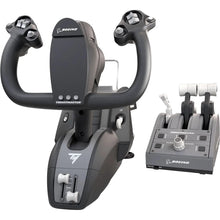
| Thrustmaster TCA Yoke Pack Boeing Edition | Yoke + throttle quadrant | Xbox Series X|S, Xbox One, PC | Boeing-style airliner yoke feel |
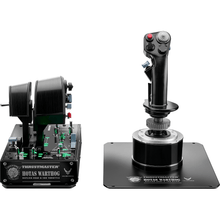
| Thrustmaster HOTAS Warthog Stick & Throttle | Premium metal HOTAS | PC | High-fidelity combat and DCS-style flying |
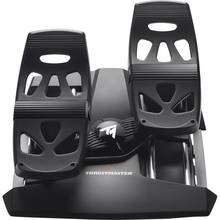
| Thrustmaster T.Flight Rudder Pedals | Rudder pedals | PS5, PS4, Xbox Series X|S, Xbox One, PC | Cross-platform pedal option |
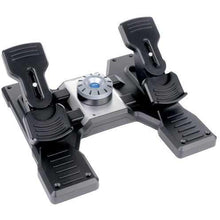
| Logitech G Saitek Pro Flight Rudder Pedals | Rudder pedals | PC | Best-value PC rudder pedals |
| Turtle Beach VelocityOne Precision Rudder Pedals | Rudder pedals | Xbox Series X|S, Xbox One, PC | Best pedals for Xbox flyers |
| Thrustmaster TPR Pendular Rudder Pedals | Premium rudder pedals | PC | Highest-realism rudder work |
Best Starter Setup vs Best Full Cockpit (Our Verdict)
Best Starter Setup
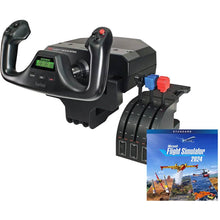
If you are starting from scratch and want the best value, our pick is the Logitech G Saitek Pro Flight Yoke and Throttle Quadrant paired with the Logitech G Saitek Pro Flight Rudder Pedals. Together they give you the three primary controls (yoke, throttle, and pedals) for realistic GA training on PC without overspending. If you are buying a sim at the same time, the Logitech G Saitek Pro Yoke Flight Bundle with Microsoft Flight Simulator includes the yoke, throttle quadrant, and a copy of MSFS so you can fly the day it arrives. Flying on console instead? The Thrustmaster HOTAS One MSFS Edition is the easiest and most affordable way to get a stick and throttle in your hands on Xbox.
Best Full Cockpit
If you are building a serious, immersive rig, go with the Turtle Beach VelocityOne Flightdeck Ultimate or the metal Thrustmaster HOTAS Warthog Stick and Throttle for hands-on control, then add the premium Thrustmaster TPR Pendular Rudder Pedals for the most realistic rudder feel money can buy. Airliner fans should look at the Thrustmaster TCA Yoke Pack Boeing Edition or the TCA Captain Pack X Airbus Edition. PC pilots who want a switch-and-radio cockpit can expand with the full Logitech G (Saitek) panel lineup.
Want a Bundle Instead of Piecing It Together?
If you would rather buy one box and get flying, our Microsoft Flight Simulator bundles pair controls with a copy of the sim. The Logitech G Saitek Basic Flight Simulation Bundle with MSFS and the Thrustmaster T.16000M FCS Flight Pack are both popular all-in-one starting points. Browse everything in one place in our flight simulator equipment collection.
Our Picks: The Best Flight Simulator Yokes, Pedals and Controls
Below is the full detail on every product in the table above, in the same order, with a consistent format so it is easy to compare. Use the comparison table for a quick scan, then read the detail on the picks that fit your platform and flying style.

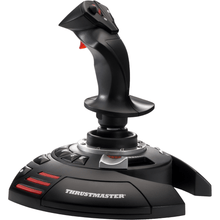
Thrustmaster T.Flight Stick X – the lowest-cost way to start flying on PC
- Control type Joystick
- Compatibility Windows PC
- Ergonomic stick with twist-grip rudder control built in
- Integrated throttle slider on the base
- Programmable buttons for views, gear, flaps, and trim
- Plug-and-play USB setup with no drivers to fight
- Hard to beat as a first stick; the twist rudder means you can fly coordinated without buying pedals on day one.
- PC-only, and once you get serious about crosswind work you will outgrow the twist rudder and want real pedals.
Perfect for the brand-new sim pilot who wants to find out if the hobby sticks before spending real money.
Click for Price →
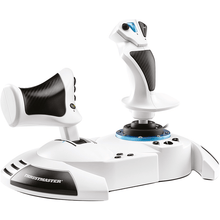
Thrustmaster HOTAS One Microsoft Flight Simulator Edition – the easiest budget HOTAS for Xbox and PC
- Control type HOTAS (stick + throttle)
- Compatibility Xbox Series X|S, Xbox One, Windows PC
- Detachable full-size throttle for one-piece or two-piece setups
- Official Xbox licensing, so it just works on console
- 14 action buttons plus a rapid-fire trigger
- Adjustable stick resistance to suit your grip
- Simple, approachable, and versatile; a great first HOTAS; good for helicopters, warbirds, and space-style flying in addition to civilian aircraft.
- Not the same realism as dedicated yokes for GA; pedals still improve realism a lot.
Perfect for new sim pilots and Xbox flyers who want a stick and throttle in hand without a big investment.
Click for Price →
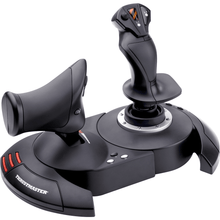
Thrustmaster T-Flight HOTAS X – entry-level HOTAS for casual PC flying
- Control type HOTAS (stick + detachable throttle)
- Compatibility Windows PC
- Detachable throttle you can run attached or separated on the desk
- 12 programmable buttons and 5 axes for core flight functions
- Twist-grip rudder built into the stick
- Weighted base that stays put during normal inputs
- A proven, no-drama way to get a real stick and throttle on PC; the detachable throttle makes it easy to fit on a small desk.
- PC-only, and the plastic feel reflects the entry price; if you already know you fly daily, step up a tier.
Perfect for the casual PC flyer who wants HOTAS ergonomics at a starter price.
Click for Price →
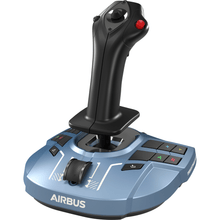
Thrustmaster TCA Sidestick X Airbus Edition – Airbus-style sidestick on a budget
- Control type Sidestick
- Compatibility Xbox Series X|S, Xbox One, Windows PC
- Ergonomic replica inspired by the real Airbus sidestick
- Built-in throttle axis on the base for single-unit flying
- Officially licensed for Xbox, plug-and-play on PC
- Swappable button layout for left- or right-hand mounting
- The cheapest way to practice genuine sidestick muscle memory; great gateway into the TCA Airbus ecosystem.
- If you mainly fly yoke-equipped GA aircraft in real life, a sidestick will not match your cockpit; pair with the matching quadrant later for full Airbus flows.
Perfect for Airbus fans on Xbox or PC who want sidestick realism without committing to a full pack.
Click for Price →
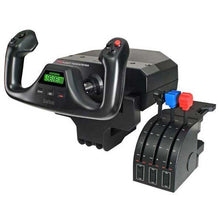
Logitech G Saitek Pro Flight Yoke & Throttle Quadrant – the best-value GA yoke setup for PC
- Control type Yoke + 3-lever throttle quadrant
- Compatibility Windows PC
- Stainless steel yoke shaft with 75 degrees of smooth rotation
- Separate 3-lever quadrant for throttle, prop, and mixture
- Integrated chronograph for timing approaches and holds
- Desk clamp included, plus USB hub ports for adding panels
- Expands into the full Logitech G (Saitek) modular panel ecosystem
- The classic starting point for GA training on PC; throttle, prop, and mixture levers mean real complex-aircraft procedures, not keyboard shortcuts.
- PC-only, and the centering spring has a noticeable detent around neutral. I trained students who flew this yoke for years and the honest answer is you learn to fly through the detent; it has never stopped anyone from nailing an ILS.
Perfect for student pilots and GA flyers who want the most training realism per dollar of any yoke on this list.
Click for Price →
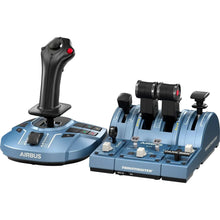
Thrustmaster TCA Captain Pack X Airbus Edition – complete Airbus sidestick and throttle flows
- Control type Sidestick + throttle quadrant
- Compatibility Xbox Series X|S, Xbox One, Windows PC
- Sidestick and dual-engine throttle quadrant in one pack
- Throttle detents for the real Airbus thrust gates (CLB, FLX, TOGA)
- Reverser-style levers for realistic rollouts
- Officially licensed Airbus replica styling
- Strong match for Airbus cockpit logic; great for pilots who prefer stick flying; good system-training feel for airliner procedures.
- If you mainly fly GA aircraft with yokes, this may not match your real cockpit muscle memory.
Perfect for Airbus enthusiasts practicing airliner flows on Xbox or PC.
Click for Price →
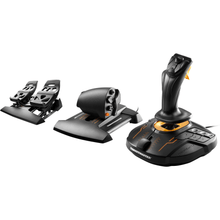
Thrustmaster T.16000M FCS Flight Pack – stick, throttle, and pedals in one box
- Control type HOTAS + rudder pedals bundle
- Compatibility Windows PC
- T.16000M stick with precise H.E.A.R.T magnetic sensors
- TWCS throttle with sliding-rail action and mappable controls
- TFRP rudder pedals included, so nothing is missing on day one
- Ambidextrous stick design for left- or right-handed pilots
- The only single purchase on this list that covers all three primary flight controls; excellent value versus buying the pieces separately.
- PC-only, and it is a HOTAS, not a yoke; GA purists who fly Cessnas in real life may still prefer the Saitek yoke route.
Perfect for the PC pilot who wants a complete stick-throttle-pedals cockpit in a single order.
Click for Price →
Logitech G X56 H.O.T.A.S. – feature-rich mid-range HOTAS with dual throttles
- Control type HOTAS (stick + dual throttle)
- Compatibility Windows PC
- Dual independent throttles for twin-engine and split-power workflows
- 189 programmable controls across stick and throttle
- Adjustable spring tension on the stick
- Twin mini analog sticks ideal for space sims and camera control
- A huge amount of mappable control for the money; the dual throttles are a genuine advantage for twins and multi-engine practice.
- PC-only, and the sheer number of controls means a real setup session before your first flight; skip it if you only fly simple single-engine patterns.
Perfect for PC pilots stepping up from an entry HOTAS who want twin-throttle capability and deep control mapping.
Click for Price →
Thrustmaster SOL-R 4 HOTAS – a modern HOTAS platform for advanced sim flying
- Control type HOTAS (stick + throttle)
- Compatibility Windows PC
- Current-generation Thrustmaster HOTAS architecture
- Deep control mapping for complex aircraft and high-workload sessions
- Designed to anchor an expandable advanced sim setup
- Designed for deep control mapping; great for pilots who want lots of hands-on control options in one system.
- PC-only; may be more than you need if you primarily fly simple GA circuits.
Perfect for PC sim hobbyists who want a feature-rich, modern HOTAS for complex aircraft and high-workload sessions.
Click for Price →
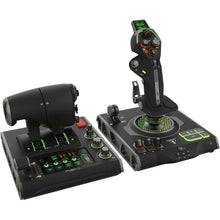
Turtle Beach VelocityOne Flightdeck Ultimate – a premium HOTAS control center for PC
- Control type HOTAS control center
- Compatibility Windows PC
- Stick and throttle with integrated display and touch panels
- Dozens of mappable buttons, dials, and axes in one footprint
- Strong immersion for airliners, helicopters, and combat aircraft
- Replaces a desk full of separate add-on panels
- Great for high-workload flying; strong immersion for complex aircraft; ideal for pilots who want lots of mappable controls without piecing together multiple products.
- PC-only; takes space; may be too much if you only fly simple GA patterns.
Perfect for PC sim enthusiasts who want a full control center in one purchase instead of a parts pile.
Click for Price →
Turtle Beach VelocityOne Premium Flight Control System – the all-in-one yoke, especially for Xbox
- Control type Yoke + integrated throttle quadrant
- Compatibility Xbox Series X|S, Xbox One, Windows PC
- Yoke and modular throttle quadrant in a single unit
- True one-box Xbox yoke solution with official compatibility
- Integrated status display and mappable controls
- 180-degree yoke rotation for smooth GA handling
- All-in-one package; yoke + throttle quadrant; strong value for console flyers; good starter-to-serious step-up.
- Larger footprint than a simple stick; you may want pedals later for better rudder realism.
Perfect for MSFS pilots on Xbox or PC who want a single purchase that gets them flying a real yoke tonight.
Click for Price →
Thrustmaster TCA Yoke Pack Boeing Edition – Boeing-style airliner yoke feel
- Control type Yoke + throttle quadrant
- Compatibility Xbox Series X|S, Xbox One, Windows PC
- Officially licensed Boeing-style yoke geometry and grip
- Throttle quadrant with airliner-style levers
- Works on Xbox and PC for airliner flows on either platform
- Ecosystem support for expanding the setup over time
- Great airliner vibe; solid ecosystem for expanding controls; good option for pilots who want yoke realism without going full cockpit build.
- You get the most realism when paired with pedals and a stable mount.
Perfect for Boeing fans practicing IFR flows who want airliner yoke feel while building toward a complete setup.
Click for Price →
Thrustmaster HOTAS Warthog Stick and Throttle – the premium metal HOTAS benchmark
- Control type Premium metal HOTAS
- Compatibility Windows PC
- All-metal stick and throttle modeled on the A-10C Warthog
- Magnetic sensors for precise, long-lasting axis accuracy
- Dual throttle with friction control and afterburner detent
- Weighted bases that stay planted under aggressive inputs
- Serious tactile feel; great for complex control mapping; popular choice for high-fidelity sim communities.
- PC-only; overkill for casual flying; you will want a stable mount and a good chair and desk setup. The first time I picked one up I was surprised by the sheer weight of the throttle unit alone, so plan real desk space for it.
Perfect for DCS-style pilots and advanced PC simmers who want premium HOTAS control and durability.
Click for Price →
Thrustmaster T.Flight Rudder Pedals – the cross-platform pedal option
- Control type Rudder pedals
- Compatibility PS5, PS4, Xbox Series X|S, Xbox One, Windows PC
- The widest platform support of any pedals on this list
- Sliding-rail pedal motion for smooth rudder inputs
- Differential toe-brake function for realistic ground handling
- Adjustable resistance to suit your leg position
- Broad compatibility; practical upgrade path if you are mixing platforms or want flexibility.
- You will still want to dial in placement and traction so they do not slide under heavy use.
Perfect for sim pilots who want pedals that can follow them across PlayStation, Xbox, and PC as their setup evolves.
Click for Price →
Logitech G Saitek Pro Flight Rudder Pedals – the best-value PC rudder pedals
- Control type Rudder pedals
- Compatibility Windows PC
- Self-centering pedals with adjustable damping
- Independent toe brakes for crosswind and taxi work
- Wide foot rests that fit boots or bare feet
- Natural companion to the Saitek Pro Flight Yoke
- Our best-selling pedals for a reason: they add the realism that matters (takeoffs, crosswind landings, slips, coordinated turns) at the lowest cost of entry for dedicated pedals.
- PC-only; put them on carpet or a non-slip mat so they stay braced under firm rudder inputs.
Perfect for budget-minded PC pilots making their first and most important realism upgrade.
Click for Price →
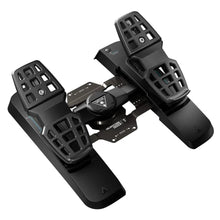
Turtle Beach VelocityOne Precision Rudder Pedals – the best pedals for Xbox flyers
- Control type Rudder pedals
- Compatibility Xbox Series X|S, Xbox One, Windows PC
- One of the few true rudder pedal options for Xbox
- Adjustable brake tension and pedal angle
- Pairs naturally with the VelocityOne yoke for a console cockpit
- Also works on Windows PC if you switch platforms later
- Great console-friendly pedal option; helps a ton with takeoff and landing realism and coordinated turns.
- Make sure your console setup supports your chosen control system requirements; consider a non-slip mat for stability.
Perfect for MSFS Xbox pilots who want real rudder feel without switching to PC.
Click for Price →
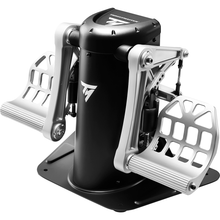
Thrustmaster TPR Pendular Rudder Pedals – the highest-realism rudder upgrade money can buy
- Control type Premium pendular rudder pedals
- Compatibility Windows PC
- Pendular suspended-pedal design that mimics real aircraft linkages
- All-metal construction with precise magnetic sensors
- Adjustable pedal angle and spring tension
- Progressive toe brakes for fine ground-handling control
- Excellent realism for coordinated flight; great upgrade for crosswind landings, slips, and precision flying; strong build quality.
- Larger footprint; best with a stable floor setup (mat or brace) so pedals do not slide. If you are still on your first stick, buy mid-range pedals first and graduate to these when precision rudder work becomes the bottleneck.
Perfect for serious IFR, GA, and tailwheel practice where precision rudder control is the whole point.
Click for Price →Related Reading
Frequently Asked Questions
- Which is better for flight training: yoke or joystick?
- If you fly a yoke-equipped aircraft in real life, a yoke usually provides better training value and muscle memory. If you fly a stick-equipped aircraft or mostly Airbus-style aircraft, a joystick or sidestick may be the better match. The goal is transfer: the closer your sim controls match the control feel of your real aircraft, the more your home practice carries over to the cockpit. For GA training on PC, the Logitech G Saitek Pro Flight Yoke is a great value starting point.
- Are rudder pedals worth it for home flight simulation?
- Yes, pedals are one of the biggest realism upgrades you can make. They improve takeoffs, crosswind landings, slips, coordinated turns, and ground handling, and they build the foot coordination that twist-grip rudders simply cannot teach. If you are trying to get real-world feel from your sim time, pedals are hard to beat. Budget PC pilots can start with the Logitech G Saitek Pro Flight Rudder Pedals.
- What should I buy first: yoke or stick, pedals, or panels?
- Start with the primary controls: a yoke or stick plus a throttle. Next, add rudder pedals for realism, since they change how every takeoff and landing feels. Panels are great for immersion and workflow practice, but they are usually a third step for most pilots. Building in this order means every purchase improves your flying immediately instead of sitting half-used while you wait for the rest of the rig. You can browse modular panels in our Logitech G (Saitek) flight sim controls collection.
- Will these controls work with Microsoft Flight Simulator on Xbox?
- Only certain units support Xbox, so check the label before you buy. In this guide, items explicitly marked as Xbox compatible (Series X, Series S, and Xbox One) are your safest choices for console flying; PC-only hardware will not connect to an Xbox at all, even with adapters. If you want the sim included in the box, check our Microsoft Flight Simulator bundles, which pair Xbox-ready controls with a copy of the game.
- Do I need a special stand or mount for my yoke or HOTAS?
- A stand is not required, but it is highly recommended for yokes and higher-end HOTAS gear. A stable mount improves control precision and prevents gear from shifting during the flare, crosswind correction, or aggressive control inputs. Desk clamps work for most setups; heavier metal gear benefits from a dedicated stand or cockpit frame, and pedals should sit on carpet or a non-slip mat so they stay braced under firm inputs.
- What is the best beginner flight sim setup?
- For PC, a yoke, throttle, and pedals combo gives the most realistic training feel for the money, and the Logitech G Saitek line is the classic budget path to all three. On Xbox, an officially licensed budget HOTAS with a stick and throttle is the easiest affordable entry. If you want one box with the sim included, a Microsoft Flight Simulator bundle is the simplest path: controls plus the game, and you are flying the day it arrives.
- Do flight simulator yokes and pedals work with X-Plane and other sims?
- Yes, most PC flight sim controls work across Microsoft Flight Simulator, X-Plane, DCS World, and other major titles, because they register as standard USB game controllers in Windows. You may need to map axes and buttons inside each sim the first time you fly, and a few titles benefit from the manufacturer's profiling software for advanced features. Console gear is different: Xbox-licensed hardware works with the sims available on Xbox, but check each title's supported-hardware list before buying.
- Can home flight simulator practice improve my real-world flying?
- Yes, within limits. A home sim with a yoke or stick, throttle, and pedals is excellent for procedure training: instrument scans, checklist flows, radio navigation, approach briefings, and holding entries. As a commercial pilot, I treat sim sessions as chair-flying with feedback rather than a stick-and-rudder substitute, since home hardware cannot reproduce control loading or seat-of-the-pants cues. Practice procedures at home, then validate handling with your instructor in the aircraft. Also note that home setups generally do not count as loggable simulator time unless the device is FAA-approved.
About the Author
Neil S. Glazer is a commercial pilot with multi-engine and instrument ratings and the founder of PilotMall.com. He has spent more than two decades helping student pilots, instructors, and aircraft owners pick the right gear, and he still flies the same procedures at home on a sim that he flies in the airplane.