




-
 SaleVendor:Logitech G
Logitech G Saitek Basic Flight Simulation Bundle w/Microsoft Flight Simulator Standard Digital Download (PC)
Regular price $389.99Sale price $389.99 Regular priceUnit price per$519.97 -
 SaleVendor:Logitech G
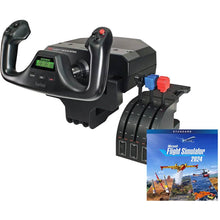
Logitech G Saitek Pro Yoke Flight Bundle w/Microsoft Flight Simulator Standard Digital Download (PC)
Regular price $229.99Sale price $229.99 Regular priceUnit price per$289.98

Complete flight simulator packages built for pilots, not gamers
A complete flight simulator package pairs compatible flight controls with simulator software in a single purchase, so you can build a realistic home cockpit without researching which yoke, throttle, and pedals work together. The packages here are PC-only and combine Logitech G Saitek controls with Microsoft Flight Simulator Standard Edition as a digital download, giving you 20 aircraft and 30 hand-crafted airports to practice procedures, instrument scans, and pattern work between lessons.
Compare the two flight simulator bundles
| Package | Controls included | Best for |
|---|---|---|
| Logitech G Saitek Pro Yoke Flight Bundle | Pro Flight Yoke and throttle quadrant, plus Microsoft Flight Simulator Standard Edition | Students who want a lower entry point and plan to add rudder pedals later |
| Logitech G Saitek Basic Flight Simulation Bundle | Pro Flight Yoke, throttle quadrant, and Pro Flight Rudder Pedals, plus Microsoft Flight Simulator Standard Edition | A first home sim you want complete out of the box, controlling pitch, roll, and yaw |
Types of home flight simulator controls
Yoke and throttle packages
A yoke replicates the control wheel found in most general aviation aircraft, making it the natural choice for student and private pilots practicing the same motions they use in a Cessna or Piper. Both bundles on this page use the Logitech G Saitek Pro Flight Yoke and throttle quadrant. If you want to start light and grow, the yoke bundle gives you the essentials and leaves room to add pedals when you are ready.
Adding rudder pedals
Rudder pedals let you control yaw and practice coordinated turns, crosswind landings, and taxi steering the way a real cockpit does. The Basic Flight Simulation Bundle includes Pro Flight Rudder Pedals from the start. You can also browse individual Logitech G Saitek flight simulation hardware to build a setup piece by piece.
HOTAS stick-and-throttle setups
If you fly jets, fighters, or fast aircraft, a HOTAS (hands on throttle and stick) configuration suits those airframes better than a yoke. Compare Thrustmaster flight simulation hardware and Turtle Beach VelocityOne controls, or explore the full range of flight simulation equipment.
How to choose the right flight simulator package
Start with the aircraft you fly or want to fly. If that is a single-engine trainer or light piston aircraft, a yoke bundle matches the controls you use in the airplane. If you are drawn to airliners or military jets, a HOTAS setup feels more natural. Next, decide whether you want pedals on day one: the Basic bundle includes them and gives you full pitch, roll, and yaw control, while the yoke bundle lets you start lighter and add pedals later. Both packages are PC-only, so confirm your computer meets Microsoft Flight Simulator system requirements, including a dedicated graphics card and adequate RAM, before you buy. Finally, plan to round out the cockpit with a pilot headset and a kneeboard for charts so your practice sessions mirror real flight.
Why buy from Pilot Mall
- Aviation-only focus. We sell flight gear and training tools, not general electronics, so every package is chosen with pilots in mind.
- Trusted for 25+ years. Pilots, flight schools, and enthusiasts rely on us for quality controls and dependable service.
- Free U.S. shipping over $100. Both bundles qualify, so your complete setup ships free within the United States.
- Expert guidance. Our team flies, and we help you pick the right yoke, pedals, and software for your goals.
Frequently Asked Questions
What is included in a complete flight simulator package?
A complete flight simulator package from Pilot Mall includes flight controls and simulator software in one purchase. Both bundles pair Logitech G Saitek controls, a yoke and throttle quadrant (with rudder pedals on the Basic bundle), with Microsoft Flight Simulator Standard Edition as a digital download featuring 20 aircraft and 30 hand-crafted airports.
Are these flight simulator packages PC-compatible?
Yes. Both flight simulator packages on this page are PC-only and run on Windows computers that meet the Microsoft Flight Simulator system requirements, including a dedicated graphics card and sufficient RAM for smooth performance.
Should I choose the yoke bundle or the bundle with pedals?
Choose the Basic Flight Simulation Bundle if you want a complete setup out of the box with rudder pedals for full pitch, roll, and yaw control. Choose the Pro Yoke Flight Bundle if you want a lower entry point and plan to add rudder pedals later.
Do I need a powerful PC for a home flight simulator?
Yes. Microsoft Flight Simulator runs best on a PC with a modern multi-core processor, a dedicated graphics card, and ample RAM. Check the current Microsoft Flight Simulator system requirements before buying to ensure smooth frame rates and detailed scenery.
Can I use a flight simulator to practice for real flight training?
A home flight simulator is a valuable tool for drilling procedures, instrument scans, and pattern work between lessons, though these consumer packages are not FAA-approved training devices and do not log official flight time. Pair your setup with flight training resources to reinforce what you learn in the airplane.
