




Pacote de simulação de voo básico Logitech G Saitek com download digital do Microsoft Flight Simulator Standard (PC)
Pacote inicial completo: manche, acelerador, pedais de leme e software, uma configuração USB plug-and-play com 20 aeronaves e 30 aeroportos prontos para voar direto da caixa.
39713
Benefícios
Benefícios
Envio e Entrega
Envio e Entrega
Devoluções
Devoluções
O pacote Logitech G Saitek Basic Flight Simulation oferece um conjunto completo de controladores de simulação de voo para PC, proporcionando controle realista e preciso e uma experiência de aviação envolvente para entusiastas e pilotos.
Este pacote abrangente inclui controles de voo Saitek de nível profissional e um download digital do Microsoft Flight Simulator Standard Edition, criando uma solução definitiva pronta para voar, pronta para uso.
Controle realista para simulação realista
Projetado para quem busca o melhor pacote de simulador de voo para PC, este pacote atende à necessidade de controle autêntico de todos os aviadores. O ergonômico Pro Flight Yoke possui um eixo de aço inoxidável durável com cronógrafo digital integrado. A unidade de controle Pro Flight Throttle oferece três alavancas e seis botões personalizáveis para gerenciamento completo do motor. Os pedais de leme Pro Flight garantem um controle suave em três eixos para movimentos de inclinação, rotação e guinada, tornando cada manobra tão realista quanto um voo real. Pilotos estudantes e entusiastas da aviação apreciam como este conjunto de controladores de simulador de voo para PC replica procedimentos reais de cockpit sem o custo do treinamento de voo tradicional.
Compatibilidade perfeita e experiência imersiva
O pacote Microsoft Flight Simulator Standard Edition dá vida a 20 aeronaves meticulosamente elaboradas e 30 aeroportos feitos à mão. Ele apresenta voos noturnos realistas, sistemas meteorológicos em tempo real e um mundo dinâmico que responde às condições em tempo real. Este sistema de manche de voo plug-and-play conecta-se via USB 2.0 e é compatível com praticamente todos os softwares populares de simulação de voo, do MSFS 2020 ao X-Plane. Compatível com Windows 10 e Windows 11, o sistema requer configuração mínima, mas oferece máxima imersão. Observação: este produto é compatível apenas com PC. As instruções para download digital são enviadas por e-mail em até 24 horas e estão disponíveis exclusivamente para clientes dos Estados Unidos. O Microsoft Flight Simulator Standard Edition Windows (Download Digital) não pode ser devolvido nem reembolsado. Se o pacote atender aos nossos critérios de devolução e for devolvido, uma taxa de US$ 59,99 pelo download digital permanecerá.
Voe com realismo incomparável usando o Pacote Logitech G Saitek, sua solução completa e pronta para voar, incluindo o Microsoft Flight Simulator. Peça o seu hoje mesmo!
Frequently Asked Questions
O que vem no Kit de Simulação de Voo Básico Logitech G Saitek?
Este kit completo para PC inclui três controles Saitek Pro Flight de nível profissional e o jogo. Você recebe o Pro Flight Yoke ergonômico com um eixo de aço inoxidável e cronógrafo digital integrado, a unidade Pro Flight Throttle com três alavancas e seis botões personalizáveis, os pedais de leme Pro Flight de três eixos e um download digital do Microsoft Flight Simulator Standard Edition.
Este kit é compatível com Xbox, Mac, ou apenas PC com Windows?
Este kit é apenas para PC. Não é compatível com Xbox ou Mac. Os controles Saitek se conectam via USB 2.0 e o sistema é compatível com Windows 10 e Windows 11. O Microsoft Flight Simulator Standard Edition incluído é um download para Windows, então planeje rodar a instalação completa em um computador com Windows.
Com qual software de simulador de voo o hardware Saitek funciona?
Os controles Saitek Pro Flight são plug and play e se conectam via USB. A PilotMall observa compatibilidade do Microsoft Flight Simulator 2020 ao X-Plane, e os controles funcionam com praticamente todos os títulos populares de simulação de voo. O kit também inclui o Microsoft Flight Simulator Standard Edition, então você está pronto para voar logo de cara.
Como o manche, o acelerador e os pedais do leme se conectam ao PC?
Cada controle Saitek Pro Flight se conecta ao seu computador via USB, e o manche usa uma conexão USB 2.0, então nenhum adaptador de energia separado é necessário. Uma vez que o manche, a unidade de acelerador e os pedais do leme são conectados ao seu PC com Windows, eles são reconhecidos para que você possa começar a configurá-los dentro do seu software de simulador de voo.
Posso montar o manche e o acelerador na minha mesa?
Sim. O Pro Flight Yoke e o Pro Flight Throttle são projetados para serem usados em uma área de trabalho. Planeje uma profundidade de superfície suficiente à sua frente para acomodar o manche e a unidade de acelerador separada, com os pedais do leme no chão abaixo, proporcionando uma posição de voo estável e estilo cockpit.
O que o controle de três eixos nos pedais do leme faz?
Os pedais de leme Pro Flight de três eixos oferecem controle suave para arfagem, rolagem e guinada, permitindo que você dirija com os pés, assim como faria em um cockpit real. Eles adicionam uma camada de realismo que um manche e acelerador sozinhos não podem, ajudando você a praticar manobras coordenadas e direção no solo de forma mais natural enquanto voa.
Preciso baixar drivers ou software para usar os controles Saitek?
Os controles Saitek Pro Flight são plug and play via USB e são reconhecidos assim que conectados ao seu PC com Windows 10 ou Windows 11. Para o controle mais completo sobre atribuições de botões e ajuste de eixo, muitos usuários instalam o software do fabricante para seu sistema. Dentro do Microsoft Flight Simulator você também pode mapear e ajustar os controles para corresponder à sua preferência de voo.
Que tipo de PC preciso para rodar o Microsoft Flight Simulator incluído?
Você precisa de um computador com Windows 10 ou Windows 11, já que o kit é apenas para PC e a Standard Edition é um download para Windows. O Microsoft Flight Simulator é um título moderno exigente, então um processador razoavelmente atual, memória ampla, uma placa de vídeo capaz e um armazenamento livre significativo ajudam. Verifique os requisitos de sistema atuais da Microsoft antes de instalar.
Quantas aeronaves e aeroportos estão no Microsoft Flight Simulator Standard Edition?
O Microsoft Flight Simulator Standard Edition incluído dá vida a 20 aeronaves meticulosamente elaboradas e 30 aeroportos feitos à mão. Ele também apresenta voos noturnos realistas, sistemas de clima ao vivo e um mundo dinâmico que responde a condições em tempo real, proporcionando um ambiente profundo e imersivo para você praticar e explorar logo de cara.
Como funciona o download digital do Microsoft Flight Simulator e como o instalo?
O jogo é entregue como um download digital em vez de um disco. As instruções de download e instalação são enviadas por e-mail em até 24 horas para que você possa configurar o título em seu PC com Windows seguindo os passos fornecidos. A Standard Edition está disponível exclusivamente para clientes dos Estados Unidos e não é retornável nem reembolsável após a entrega.
O kit é retornável e o que acontece com a cobrança do jogo em caso de devolução?
O download digital do Microsoft Flight Simulator Standard Edition não é retornável nem reembolsável após a entrega. Se o kit atender aos critérios de devolução da PilotMall e for devolvido, a cobrança pela parte do download digital permanece, enquanto o hardware é tratado sob a devolução. Entre em contato com o suporte da PilotMall antes de devolver para que a equipe possa orientá-lo.
Este conjunto é bom para iniciantes completos e pilotos estudantes, não apenas pilotos treinados?
Sim. O kit combina controles realistas de manche, acelerador e leme com o Microsoft Flight Simulator, para que os recém-chegados possam aprender os fundamentos do voo em um ambiente doméstico acessível. Pilotos estudantes e entusiastas da aviação usam configurações como esta para replicar procedimentos de cockpit e trabalho de instrumentos. Funciona melhor em conjunto com o treinamento de voo real, pois o tempo prático em aeronaves ainda é essencial.
-
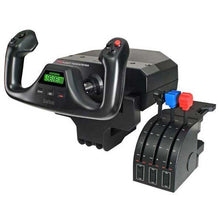 Fornecedor:Logitech G
Logitech G Saitek Pro Saitek Flight Yoke e sistema de quadrante de aceleração (PC)
Manche (yoke) e quadrante de aceleração para desktop, para voos de simulação de aviação geral realistas, com botões programáveis em vários perfis que criam memória muscular para a cabine.
Preço normal $179.99Preço promocional $179.99 Preço normalPreço unitário por$229.99 -
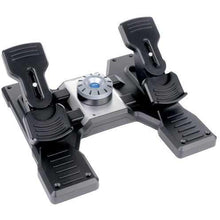 Fornecedor:Logitech G
Pedais de leme de voo Logitech G Saitek Pro Saitek (PC)
Pedais de leme com centragem automática e freios nos dedos para simuladores de desktop, uma configuração USB simples compatível com Microsoft Flight Simulator, X-Plane, FSX e Prepar3D.
Preço normal $179.99Preço promocional $179.99 Preço normalPreço unitário por$229.99 -
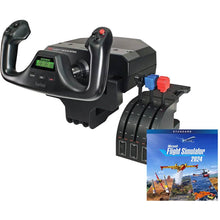 Fornecedor:Logitech G
Pacote de voo Logitech G Saitek Pro Yoke com download digital padrão do Microsoft Flight Simulator (PC)
Conjunto de manche e manete com o simulador para começar a pilotar hoje, uma configuração USB plug-and-play que inclui 20 aeronaves prontas para explorar desde o primeiro voo.
Preço normal $229.99Preço promocional $229.99 Preço normalPreço unitário por$289.98 -
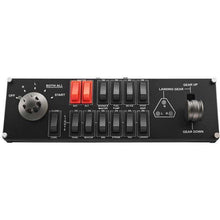 Fornecedor:Logitech G
Painel de interruptores de voo Logitech G Saitek Pro (PC)
Painel do switch e do trem de pouso para um cockpit de simulação de hardware, proporcionando cliques táteis autênticos e feedback de status de LED em tempo real para uma configuração realista.
Preço normal $119.99Preço promocional $119.99 Preço normalPreço unitário por$129.99 -
 Fornecedor:Logitech G
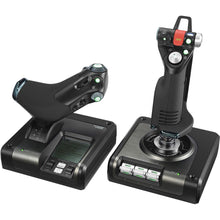
Sistema de controle de voo Logitech G Saitek X52 Pro HOTAS (PC)
HOTAS programável com display multifuncional para controle aprofundado, um sistema de PC de nível profissional desenvolvido para controle de simulação de voo preciso e realista.
Preço normal $229.99Preço promocional $229.99 Preço normalPreço unitário por$259.99 -
 Fornecedor:Logitech G
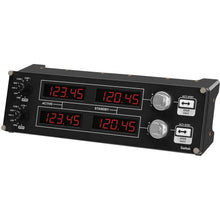
Painel de rádio de voo Logitech G Saitek Pro (PC)
Painel de rádio e frequência de navegação que se conecta a um cockpit de simulador de hardware, via USB, para controle em tempo real no Microsoft Flight Simulator, X-Plane e FSX.
Preço normal $169.99Preço promocional $169.99 Preço normalPreço unitário por$199.99
