




-
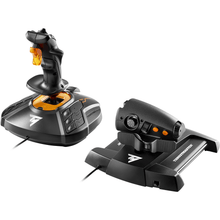 EsgotadoFornecedor:Thrustmaster
Thrustmaster T.1600M FCS HOTAS (PC)
Manche e acelerador HOTAS ambidestros com sensores magnéticos, uma configuração precisa e personalizável para pilotos que usam Microsoft Flight Simulator ou outros simuladores de voo para PC.
Preço normal $169.99Preço promocional $169.99 Preço normalPreço unitário por -
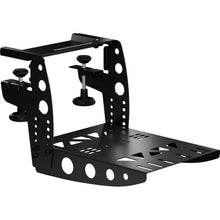 EsgotadoFornecedor:Thrustmaster
Grampo voador Thrustmaster TM
Braçadeira de mesa que prende controles de simulador de voo à sua mesa ou equipamento, um suporte todo em metal construído para acessórios TCA e T.16000M ficarem firmes através de manobras difíceis.
Preço normal $79.99Preço promocional $79.99 Preço normalPreço unitário por -
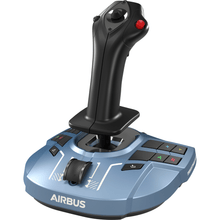 Fornecedor:Thrustmaster
Thrustmaster TCA Sidestick X Airbus Edition (Xbox Series X|S, One, PC)
Manche lateral estilo Airbus para simulação realista de avião, uma réplica oficial licenciada em escala 1:1 com 17 botões táteis para controle total dos sistemas da aeronave.
Preço normal $119.99Preço promocional $119.99 Preço normalPreço unitário por -
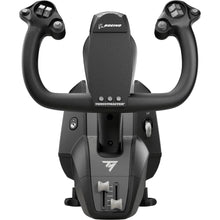 EsgotadoFornecedor:Thrustmaster
Thrustmaster TCA Yoke Boeing Edition (Xbox Series X|S, One, PC)
Boeing-style airliner yoke for study-level airline simming, an officially licensed Boeing 787 replica built for pilots who want authentic heavy-jet hand-flying feel.
Preço normal $399.99Preço promocional $399.99 Preço normalPreço unitário por -
 EsgotadoFornecedor:Thrustmaster
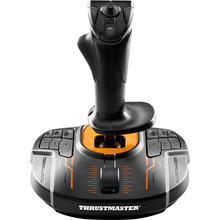
Thrustmaster T.16000M FCS (PC)
Manche de precisão ambidestro com sensores magnéticos de efeito Hall que oferecem precisão de 16.000 pontos, construído para pilotos que desejam controle suave em qualquer simulador de voo para PC.
Preço normal $79.99Preço promocional $79.99 Preço normalPreço unitário por -
 EsgotadoFornecedor:Thrustmaster
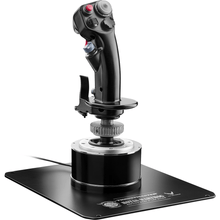
Thrustmaster HOTAS Warthog Flight Stick (PC)
All-metal military flight stick modeled on Air Force A-10C controls, weighing over 6 pounds for the heft and stability serious combat sim pilots expect at the desk.
Preço normal $279.99Preço promocional $279.99 Preço normalPreço unitário por -
 Fornecedor:Thrustmaster
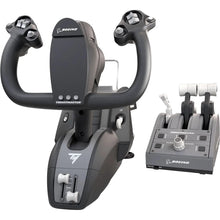
Pacote Thrustmaster TCA Yoke Edição Boeing (Xbox Series X|S, One, PC)
Manche tipo Boeing e quadrante de aceleração para simulação de voo de avião, replicando os controles em tamanho real da cabine de comando do 787 para procedimentos autênticos de avião.
Preço normal $499.99Preço promocional $499.99 Preço normalPreço unitário por -
 Fornecedor:Thrustmaster
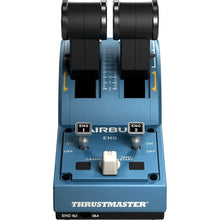
Edição Airbus Quadrant Thrustmaster TCA (PC)
Manete de potência duplo estilo Airbus com retenções e 16 botões, mais 2 eixos de navegação e paradas de aceleração reais (Idle, Climb, Flex e TO/GA) para realismo de simulador de avião comercial.
Preço normal $129.99Preço promocional $129.99 Preço normalPreço unitário por -
 NovoFornecedor:Thrustmaster
Thrustmaster SOL-R 4 HOTAS - Sistema Avançado de Simulação de Voo (PC)
An ambidextrous joystick and a robust throttle combine into an accessible HOTAS setup that gives everyday flight simmers precise, confident control without a steep price.
Preço normal $339.99Preço promocional $339.99 Preço normalPreço unitário por$349.99

Frequently Asked Questions
Quais controles de simulador de voo funcionam em um PC?
Quase todos os controles de simulador dedicados funcionam em PCs com Windows, incluindo joysticks e painéis Logitech G (Saitek), joysticks e HOTAS Thrustmaster e sistemas Turtle Beach VelocityOne. Eles se conectam via USB e são plug-and-play com o Microsoft Flight Simulator e o X-Plane.
Devo comprar um manche ou um HOTAS para simulação de voo?
Escolha um manche se você voa principalmente aeronaves de aviação geral e aviões de linha, pois ele corresponde ao manche real. Escolha um HOTAS (manche e acelerador) se você voa jatos, aviões de guerra ou helicópteros, onde um manche central é mais autêntico e responsivo.
Do que preciso para começar a simular voo no PC?
No mínimo, você precisa de um software de simulador, como o Microsoft Flight Simulator, e um controle primário, geralmente um manche ou um joystick. A maioria dos pilotos adiciona pedais de leme em seguida, depois um quadrante de acelerador e painéis de instrumentos à medida que montam o cockpit.
Esses controles funcionam com o Microsoft Flight Simulator e o X-Plane?
Sim. Os controles de PC nesta coleção são projetados para o Microsoft Flight Simulator e também são compatíveis com o X-Plane e a maioria dos outros simuladores de voo para Windows. Cada um é reconhecido automaticamente, e as configurações podem ser personalizadas dentro do simulador.
Posso adicionar pedais de leme e painéis mais tarde?
Sim. Os sistemas Logitech G e Thrustmaster são modulares, então você pode começar com um manche ou joystick e adicionar pedais de leme, um quadrante de acelerador e painéis de instrumentos ao longo do tempo, cada um conectando-se por USB sem substituir o que você já possui.
No questions match your search. Try another term or ask our team.
