





Best Flight Simulators & Equipment Money Can Buy
Non-pilots may view flight simulators as nothing more than glorified video games, but serious pilots recognize and appreciate the value of the hands-on training opportunity. With flight time at a premium, the ability to build instrument flight rules (IFR) hands-on skills from home can be a powerful career-boosting asset.


Flight Simulators: More Than Just Games (2026 Update)
Non-pilots may view flight simulators as nothing more than glorified video games, but pilots recognize what a good sim setup really is: a practical way to stay sharp between flights and build repeatable “chair flying” reps at home.
With flight time at a premium, an at-home simulator can help you practice flows, scan discipline, radio work, instrument procedures, and workload management. It’s also a fun way to explore new airports, weather, and aircraft profiles without burning avgas.
How we picked these “best flight simulators” (hardware)
We focused on what matters most for realism and learning: control feel, precision, reliability, platform compatibility (PC/Xbox), and a logical upgrade path. Everything featured below is currently offered at PilotMall.com, with direct links and images.
What components are part of a flight simulator?
A home flight simulator is scalable. You can start with a single controller (stick or yoke) and expand over time. Most setups include:
- Primary controls: yoke or joystick (sidestick/HOTAS)
- Throttle: integrated or separate quadrant
- Rudder pedals: optional at first, but a huge realism upgrade
- Panels: radio/multi/switch/instrument panels for muscle memory
- Software: PC sim software varies by training goals (VFR scenery, IFR procedures, airliners, etc.)
Quick picks: Best flight sim hardware for most people
Best “start flying today” bundle (PC)

If you want an all-in-one “open the box and go fly” solution on PC, this bundle is a simple starting point. It gets you into a yoke-based setup right away and keeps the learning curve manageable for new sim pilots.
Best yoke + software bundle (PC)
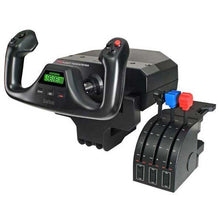
Logitech G Saitek Pro Yoke Flight Bundle w/Microsoft Flight Simulator Standard Digital Download (PC)

Ideal if you know you want yoke flying (GA training, instrument practice, airliners) but you’re not ready to add pedals yet. You can build up from here with pedals and panels later.
Best all-around control system for Xbox + PC
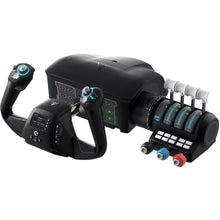
Turtle Beach VelocityOne Premium Flight Simulator Control System (Xbox Series X|S, One, PC)

A strong pick when you want one premium system that works across Xbox and PC. Great for pilots who want to practice regularly without constantly reconfiguring hardware.
Best rudder pedals for Xbox + PC
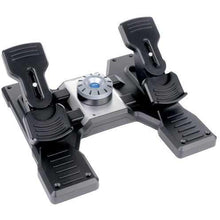
Turtle Beach VelocityOne Precision Flight Simulator Rudder Pedals (Xbox Series X|S, One, PC)

If you’re serious about coordinated turns, crosswind work, and realistic taxi/takeoff/landing control, pedals are the upgrade you’ll feel immediately.
Best flight sim setups by flying style
Best “easy entry” full kit for Xbox + PC
Thrustmaster T.Flight Full Kit X (Xbox Series X|S, One, PC)

Want a complete “starter cockpit” that doesn’t overwhelm you? This is a friendly on-ramp—especially for casual sim pilots and students who want to practice basics without going fully down the rabbit hole on day one.
Best HOTAS for Microsoft Flight Simulator on Xbox + PC
Thrustmaster HOTAS One Microsoft Flight Simulator Edition (Xbox Series X|S, One, PC)

Excellent for pilots who prefer stick flying (helicopters, taildraggers, bush flying, or just a compact desk setup).
Best Airbus-style sidestick option
Thrustmaster TCA Sidestick X Airbus Edition (Xbox Series X|S, One, PC)

If you’re practicing Airbus-style handling or simply want a modern sidestick feel, this is the most direct route.
Best Airbus throttle quadrant add-on (PC)
Thrustmaster TCA Quadrant Airbus Edition (PC)

A strong upgrade for pilots who want more realistic thrust/engine handling and detents for an Airbus-style workflow.
Best Boeing-style yoke options
Thrustmaster TCA Yoke Boeing Edition (Xbox Series X|S, One, PC)

Thrustmaster TCA Yoke Pack Boeing Edition (Xbox Series X|S, One, PC)

If you want a yoke experience oriented toward Boeing-style flying, these are the most purpose-built options in the lineup.
Best enthusiast / “I want the good stuff” HOTAS (PC)
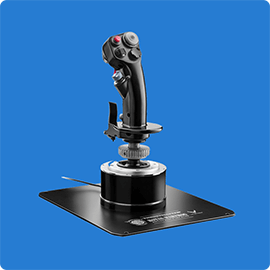
Thrustmaster HOTAS Warthog Stick and Throttle (PC)

Thrustmaster Viper TQS Mission Pack: Metal Throttle Quadrant System (PC)

Turtle Beach VelocityOne Flightdeck Ultimate PC HOTAS Controller (PC)

These are geared toward sim pilots who want deeper control, higher precision, and a more “serious” cockpit feel for military aircraft, advanced GA, or high workload sim sessions.
Best flight simulator panels & add-ons (for realism and muscle memory)
Panels won’t magically make you a better pilot—but they can help build cockpit flow and “hands know where to go” habits.
Radio & autopilot workflow


Switches & “hands-on” cockpit habits
Logitech G Saitek Pro Flight Switch Panel (PC)

Instrument display add-on
Logitech G Saitek Pro Flight Instrument Panel (PC)

Build-your-own “best flight simulator” (recommended upgrade paths)
Path 1: Student pilot / GA basics (PC)
- Start: Logitech G Saitek Pro Yoke Bundle + MSFS (PC)
- Upgrade next: Logitech G Saitek Pro Flight Rudder Pedals (PC)
- Then add: Radio Panel + Multi Panel
Path 2: Console-friendly realism (Xbox + PC)
Path 3: Airbus training vibe
- Start: TCA Sidestick X (Airbus Edition)
- Add: TCA Quadrant (Airbus Edition)
- Later: Thrustmaster T.Flight Rudder Pedals or Thrustmaster TPR Pendular Rudder Pedals (PC)
FAQ: Best Flight Simulators
What is the best flight simulator for beginners?
Most beginners do best with a simple, stable setup: a yoke or stick you can afford, plus a basic throttle. For PC pilots who want the easiest “start now” option, a bundle like the Logitech Saitek Basic Flight Simulation Bundle is a straightforward entry point.
Do I need rudder pedals for a realistic flight simulator?
You can start without them, but pedals are one of the biggest realism upgrades you can buy. If you’re practicing landings, crosswinds, slips, or coordinated turns, you’ll feel the difference immediately. For Xbox + PC, consider the VelocityOne Rudder Pedals. For PC pilots building out a Saitek/Logitech ecosystem, the Saitek Pro Flight Rudder Pedals are a common next step.
Is a yoke or joystick better for flight training?
It depends on what you fly (or plan to fly). Many GA aircraft and airliners use yokes, while modern airliners (like Airbus) use sidesticks. If your goal is transferable “feel,” match your hardware to your typical cockpit. If your goal is general skills, scan, workload, procedures either option works.
What’s the best flight simulator setup for Xbox?
For most Xbox pilots, the simplest high-quality option is the Turtle Beach VelocityOne Flight Control System, with pedals added later for realism.
Are panels worth it?
Panels are worth it if you’re practicing flows, IFR procedures, radio/nav management, or autopilot habits. The Radio Panel and Multi Panel are popular because they reduce “mouse flying” and help build tactile routine.
Can a home simulator log FAA time?
Some training credit depends on the device and approvals (for example, FAA-approved aviation training devices). A typical consumer home sim is best treated as a proficiency and learning tool: great for procedures and practice, but not a guaranteed substitute for logged training time.
Takeaway
The “best flight simulator” is the one you’ll actually use consistently. Start with reliable controls, add rudder pedals when you can, and upgrade with panels if you want stronger cockpit flow and muscle memory. Whether you’re a student pilot, an IFR-focused instrument grinder, or a weekend sim flyer, a thoughtful setup can make your practice more repeatable—and a lot more fun.
Updated for 2026
This guide is reviewed regularly to keep product recommendations aligned with current Pilot Mall inventory.


1 comment
je viens de débuter des cours de vol sur Cesna 152. je cherche un simulateur avec les commandes standard couplé avec MFS 2020 afin de me familiariser avec les instruments. je possède un pc Asus ROG 17 gamer sur Windows 11 .pour un budget de 1400€ que me conseillez vous ?