



Computador de Voo E6B: Como Usar e Qual Comprar


O computador de voo E6B é a ferramenta legal da FAA que lida com a matemática essencial do planejamento de voo: velocidade de solo e tempo em rota, consumo de combustível, velocidade real do ar, ângulo de correção de vento e altitude de densidade. Todo aluno piloto aprende a usá-lo, os examinadores esperam que você o demonstre, e ele nunca perde sinal ou bateria no cockpit. Este guia explica o que um E6B faz, como usá-lo e como escolher entre um modelo manual de régua de cálculo, uma unidade eletrônica e o transferidor que completa seu kit de navegação.
A Pilot Mall tem em estoque E6Bs mecânicos, modelos eletrônicos e transferidores VFR das marcas que os instrutores confiam, ASA e Jeppesen. Veja todos na coleção de computadores de voo e transferidores.
Adquira seu computador de voo
E6Bs manuais, calculadoras eletrônicas e transferidores VFR da ASA e Jeppesen.
Comprar computadores de voo e transferidores →O que um E6B faz
Um E6B é uma calculadora de aviação especialmente projetada com dois lados. O lado da régua de cálculo circular lida com problemas de multiplicação e divisão: velocidade de solo e tempo em rota, consumo de combustível e autonomia, velocidade real do ar a partir da indicada e altitude de densidade. O lado do vento, uma grade giratória, resolve o triângulo de vento para que você possa encontrar seu ângulo de correção de vento e velocidade de solo para um rumo planejado. Juntos, eles permitem que você construa um registro de navegação VFR completo antes mesmo de ligar o motor.
Como usar um E6B
O lado da calculadora funciona com proporções. Alinhe dois valores conhecidos nas escalas interna e externa e leia a resposta sob um terceiro. Alguns exemplos que você usará constantemente:
- Velocidade de solo e tempo: defina a distância percorrida ao longo do tempo decorrido para encontrar a velocidade de solo, então leia o tempo restante para a distância que falta.
- Consumo de combustível: defina sua taxa de consumo em relação ao índice de taxa para ler o combustível total para uma perna, ou autonomia a partir do combustível a bordo.
- Velocidade real do ar e altitude de densidade: defina a altitude de pressão em relação à temperatura na janela de velocidade do ar para corrigir a velocidade indicada do ar e ler a altitude de densidade.
No lado do vento, trace o vento, gire o curso verdadeiro sob o índice e leia diretamente o ângulo de correção do vento e a velocidade de solo. A maioria dos instrutores faz com que os alunos dominem a unidade manual primeiro, porque trabalhar as proporções à mão constrói o entendimento que uma unidade eletrônica esconde.
Manual, eletrônico e transferidores
E6B manual (mecânico)
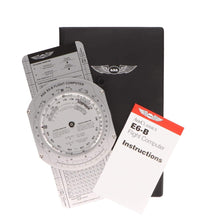
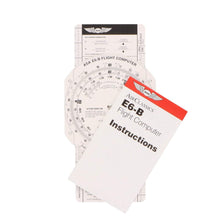
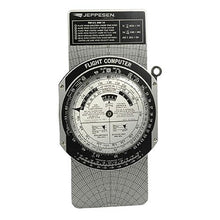
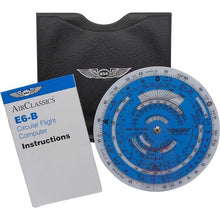
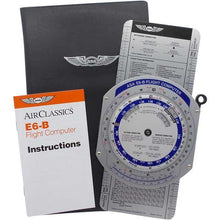
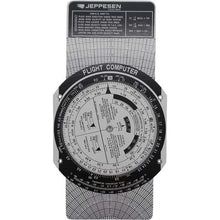
Um E6B manual tipo régua de cálculo nunca precisa de pilhas, não pode falhar no dia do teste e força você a entender as relações por trás de cada resposta, razão pela qual a maioria dos CFIs recomenda que um aluno tenha um primeiro. O Computador de Voo E6B de Papel ASA é o ponto de entrada de baixo custo, enquanto o ASA E6B de Alumínio e o Jeppesen Metal E6-B adicionam durabilidade que sobrevive a anos em uma bolsa de voo. O E6B circular de janela redonda é uma alternativa compacta, e o ASA Color E6B melhora a legibilidade.
E6B eletrônico
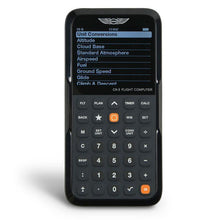
Um E6B eletrônico resolve os mesmos problemas mais rapidamente com menos etapas, o que ajuda quando você está realizando voos cross-country reais. O Computador de Voo ASA CX-3 é aceito em testes de conhecimento da FAA e adiciona funções de temporizador, relógio e conversão de unidades.
Transferidores
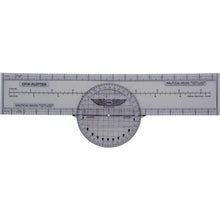
A pilotagem e o planejamento por estima precisam de um transferidor para medir o curso e a distância em uma carta seccional. O Transferidor Rotativo ASA combina com qualquer E6B para completar um fluxo de trabalho de registro de navegação VFR.
Como escolher o computador de voo certo
- Comece com um E6B manual. Os examinadores geralmente esperam que você demonstre a unidade manual, então a maioria dos alunos compra um modelo mecânico primeiro e adiciona eletrônicos mais tarde.
- Decida entre mecânico ou eletrônico. As unidades mecânicas são livres de bateria e baratas; as unidades eletrônicas como o CX-3 são mais rápidas e reduzem as etapas em longos voos cross-country.
- Combine o layout em que você treina. Os E6Bs da ASA e Jeppesen leem ligeiramente diferente, então escolha o que seu instrutor e materiais de estudo usam.
- Adicione um transferidor. Um transferidor rotativo completa o kit de planejamento VFR e é necessário para medição de curso e distância em cartas seccionais.
Compare as opções
| Modelo | Tipo | Melhor para |
|---|---|---|
| E6B de Papel ASA | Manual | Primeiro computador de menor custo para treinamento |
| E6B de Alumínio ASA | Manual | Uma unidade manual durável para anos de uso |
| E6B Circular ASA | Manual | Régua de cálculo compacta de janela redonda |
| ASA CX-3 | Eletrônico | Planejamento mais rápido, aceito em testes da FAA |
| Transferidor Rotativo ASA | Transferidor | Curso e distância em seccionais |
Perguntas Frequentes
O E6B é permitido no teste de conhecimento da FAA?
Sim. Ambos os E6Bs manuais e modelos eletrônicos aprovados, como o ASA CX-3, são permitidos nos testes de conhecimento da FAA. Confirme as regras de teste atuais antes do seu exame.
Devo comprar um E6B manual ou eletrônico primeiro?
Comece com um E6B manual tipo régua de cálculo. Os examinadores geralmente esperam que você demonstre a unidade manual, e trabalhar as proporções à mão constrói o entendimento que uma unidade eletrônica esconde. Adicione um modelo eletrônico mais tarde para velocidade.
O que um E6B calcula?
Velocidade de solo e tempo em rota, consumo de combustível e autonomia, velocidade real do ar, ângulo de correção de vento e altitude de densidade, além de conversões de unidades. O lado do vento resolve o triângulo de vento para rumo e velocidade de solo.
ASA ou Jeppesen E6B?
Ambos são excelentes. As escalas leem ligeiramente diferente, então escolha a marca que seu instrutor e materiais de estudo usam para que sua prática corresponda à sua referência.
Ainda preciso de um transferidor?
Sim, para planejamento VFR. Um transferidor rotativo mede o curso e a distância em uma carta seccional e combina com qualquer E6B para completar seu fluxo de trabalho de registro de navegação.