

-
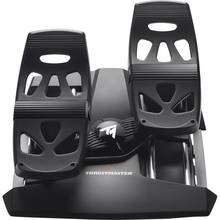
Proveedor:ThrustmasterPedales de timón Thrustmaster T.Flight (PS5, PS4, Xbox Series X|S, One, PC)
Precio habitual $129.99Precio de oferta $129.99 Precio habitualPrecio unitario por -
OfertaNuevoProveedor:ThrustmasterThrustmaster SOL-R 4 HOTAS - Sistema avanzado de simulación de vuelo (PC)
Precio habitual $339.99Precio de oferta $339.99 Precio habitualPrecio unitario por$349.99
PlayStation flight simulator controls for PS5 and PS4
Flying Microsoft Flight Simulator on a PlayStation feels far more like the real thing once you move past the standard controller and add dedicated hardware. The catch on console is compatibility: not every flight sim control that works on PC will work on a PS5 or PS4, so the first job is matching the right gear to your platform. The headline piece in this collection, the Thrustmaster T.Flight Rudder Pedals, is built for PS5, PS4, Xbox, and PC, which makes it a safe console choice. Use the table below to see what runs on PlayStation versus what is PC-only, then read on for how to pick between a stick, a yoke, and a HOTAS.
Compare these controls at a glance
| Product | Type | Platforms | Best for |
|---|---|---|---|
| Thrustmaster T.Flight Rudder Pedals | Rudder pedals with sliding rails and toe brakes | PS5, PS4, Xbox Series X|S, Xbox One, PC | Adding foot-controlled rudder on a PlayStation cockpit |
| Thrustmaster SOL-R 4 HOTAS | HOTAS flight stick and throttle | PC only | A space and combat style HOTAS on Windows PC |
Note the platform column: the T.Flight Rudder Pedals are the PlayStation-compatible product here, while the SOL-R 4 HOTAS is a PC-only system. If you need a flight stick that runs on PS5 or PS4, see the section below on choosing a console HOTAS.
Yoke, flight stick, or HOTAS: how to choose
Flight stick and HOTAS
A flight stick is a center stick you fly with one hand; a HOTAS pairs that stick with a matching throttle so both hands stay on the controls. Sticks and HOTAS suit fighters, aerobatics, and bush flying, and they are the most common way to get a dedicated controller working on a PlayStation. On PS5 and PS4 you must use a stick that is specifically console-compatible, since most PC sticks will not be recognized by the console.
Yoke
A yoke is the two-handed control column found in most airliners and general aviation aircraft, and many pilots prefer it for civil and tube-liner flying. Yokes are common on PC and Xbox setups; if you fly mostly on PlayStation, confirm console support before buying, because the widely available console options today are flight sticks and HOTAS rather than yokes.
Rudder pedals
Rudder pedals add the foot axis a stick or yoke cannot, which matters for coordinated turns, taxiing, and crosswind landings. The Thrustmaster T.Flight Rudder Pedals work on PS5, PS4, Xbox, and PC, so they slot into a PlayStation rig and pair with whichever stick or HOTAS your console supports.
Getting set up with Microsoft Flight Simulator on PlayStation
Microsoft Flight Simulator runs on PS5, and most console-compatible controls are plug-and-play: connect the device by USB, let the console recognize it, then open the in-sim controls menu to confirm or remap the axes. Start with the piece that most improves your flying, then expand. Many PlayStation pilots begin with a console-compatible flight stick or HOTAS for pitch, roll, and throttle, then add the T.Flight Rudder Pedals for true rudder. If you fly on PC as well, your hardware choices open up considerably, and you can compare options across our Thrustmaster, Logitech and Saitek, and Turtle Beach VelocityOne lineups, or browse the full flight simulator equipment range.
Why buy from Pilot Mall
- Aviation only: we sell pilot gear and flight sim hardware and nothing else, so our team knows the difference between a yoke, a flight stick, a HOTAS, and rudder pedals.
- Real flight crew on staff: talk to people who actually fly before you build your PlayStation sim cockpit.
- Trusted for 25-plus years: pilots and sim enthusiasts rely on Pilot Mall for cockpit equipment.
- Free U.S. shipping over $100: the T.Flight Rudder Pedals and most setups qualify.
- Click any product for current pricing and full platform details before you order.
Frequently Asked Questions
Can you use a flight stick on PS5 for a flight simulator?
Yes, but the stick must be specifically PS5-compatible, because most PC flight sticks will not be recognized by the console. A console-compatible flight stick or HOTAS connects by USB and works with Microsoft Flight Simulator on PS5, giving you dedicated pitch, roll, and throttle control instead of relying on the standard controller.
What flight controls work with Microsoft Flight Simulator on PS5?
On PS5 you need controls that are certified for PlayStation. That includes PlayStation-compatible flight sticks and HOTAS systems for pitch, roll, and throttle, plus PS5-compatible rudder pedals such as the Thrustmaster T.Flight Rudder Pedals for foot-controlled rudder. PC-only devices, including some HOTAS, will not work on the console.
Do the Thrustmaster T.Flight Rudder Pedals work with PS5 and PS4?
Yes. The Thrustmaster T.Flight Rudder Pedals are compatible with PS5, PS4, Xbox Series X|S, Xbox One, and PC. They add a true rudder axis with toe brakes for coordinated turns, taxiing, and crosswind landings, and they pair with whichever console-compatible flight stick or HOTAS you fly on your PlayStation.
Is the Thrustmaster SOL-R 4 HOTAS compatible with PlayStation?
No. The Thrustmaster SOL-R 4 HOTAS is a PC-only system, as its product title states, so it does not work on PS5 or PS4. If you fly on a PlayStation and want a HOTAS, look for a model listed as PlayStation-compatible; the SOL-R 4 is intended for Windows PC flight simulation.
Can you connect a HOTAS and rudder pedals together on a PlayStation?
Yes. On a PlayStation you can run a console-compatible flight stick or HOTAS alongside PS5 and PS4 rudder pedals so you have pitch, roll, throttle, and rudder all on dedicated hardware. Connect each device, let the console recognize it, then confirm the axis assignments in the Microsoft Flight Simulator controls menu.
Does PlayStation 5 support third-party flight sim controllers?
PlayStation 5 supports third-party flight sim controllers only when they are licensed or certified for the console. That is why a device may run perfectly on PC yet not be detected on PS5. Always check that a flight stick, HOTAS, or set of rudder pedals lists PS5 or PS4 compatibility before buying for console use.
