




How To Listen To Air Traffic Control On A Scanner (Guide)
Maybe you are a student pilot in training or you just have an interest in aviation. No matter what your goals are, this guide will walk you through everything you need to know about how to listen to ATC on a scanner.


Ever wondered what pilots and air traffic controllers are actually saying to each other? Listening to air traffic control (ATC) on a scanner or aviation handheld radio is the fastest free education in aviation communication there is. It is completely legal in the United States, and you can start tonight with nothing more than your phone.
Maybe you are a student pilot trying to build radio confidence before your first solo, a plane spotter at the airport fence, or just curious about the chatter above your house. This guide covers the equipment, the frequencies, the lingo, and the best handheld radios for hearing ATC clearly.
Key Takeaways
- Listening to ATC is legal for civilians in the U.S. You need a receiver that covers the VHF airband, 118.000 to 136.975 MHz in AM mode, or a free internet stream.
- Find your airport's exact frequencies in the FAA Chart Supplement, on SkyVector, or on AirNav, then start with ATIS and Tower before moving to Approach.
- ATC phraseology is standardized. Learn roughly fifteen core phrases and the transmissions decode themselves.
- LiveATC.net streams hundreds of airports for free, but feeds run 10 to 45 seconds behind real time. At the airport fence, a real VHF radio wins.
- If you ever plan to fly, buy a com-capable aviation handheld instead of a generic scanner. It does everything a scanner does and becomes your backup radio in the cockpit.

What Equipment Do You Need to Listen to ATC?
To listen to air traffic control over the air, you need a scanner or radio capable of receiving Very High Frequency (VHF) signals in the aviation band. Aviation uses AM modulation, not the FM used by public safety bands, so check that any scanner you consider explicitly lists "AM airband" coverage.
-
Scanners and Aviation Radios
Look for a unit that covers the airband between 118.000 and 136.975 MHz. General-purpose scanners like the Uniden Bearcat line receive this band, while purpose-built aviation handhelds from Icom and Yaesu receive it with better audio and double as transmitters once you earn your certificate. We compare the best options in the radio picks section below.
-
Smartphones and Computers
Apps and sites like LiveATC.net stream ATC communications straight to your phone or computer. It is a convenient way to hear commercial traffic, takeoff and landing clearances, and busy international hubs without buying hardware, and you can monitor multiple frequencies just by opening more browser tabs.
Keep the delay in mind, though. According to LiveATC's FAQ, most listeners hear audio less than 20 seconds behind the actual transmission, and some users report delays from 10 to 45 seconds depending on the feed and connection.
-
Antenna Setup
A high-quality antenna improves signal reception more than any other upgrade. Position it in an open area or near a window for best results. VHF is line-of-sight, so elevation beats power: a modest antenna on a second floor will outperform a great one in a basement.
Once you have your gear or app, tune in to your nearest airport's frequencies and start listening.

How to Find ATC Frequencies
ATC operates on a wide range of frequencies, but finding the right ones is easier than you might think. Follow these steps:
Start With Airport Information
Check online resources like the FAA's Chart Supplement Search, SkyVector, or AirNav to find the published frequencies for your local airport.
Understand the Basics
ATC frequencies are divided by function: Ground, Tower, Approach, and Departure. Which one you tune depends on the phase of flight you want to hear. Tower is the most action-packed place to start.
Scan Manually
If your scanner or handheld has a search function, sweep the aviation band until you pick up transmissions. This is a great way to discover active frequencies you did not know about.
Monitor Common Frequencies
Many airports use easy-to-find standard frequencies for ATIS (Automatic Terminal Information Service) and Ground Control. At small or uncontrolled airports, listen to pilots coordinating directly with each other on the Common Traffic Advisory Frequency (CTAF) for the area, commonly 122.7, 122.8, or 123.0 MHz. And put 121.5 MHz, the emergency frequency, in a memory slot.

Types of Aviation Communications
When you tune in, you will encounter several distinct types of transmissions. Each category has its own dedicated frequencies, and larger airports may run multiple channels for each function:
-
Airport Traffic and Ground Control
These cover aircraft movements on the ground and in the vicinity of the airport. Busy airports might have separate controllers for north and south operations.
-
En Route Traffic Control
This is communication between pilots and Air Route Traffic Control Centers (ARTCC) as aircraft travel cross-country at altitude.
-
Air-to-Air Communication
Informal and used for location coordination. Pilots may chat with each other directly, especially in remote areas.
-
CTAF (Common Traffic Advisory Frequency)
Used at non-towered airports for pilots to announce their positions and intentions in the traffic pattern.
-
Ground Operations
Communication with support services like fueling, de-icing, and maintenance vehicles.

AWOS, ASOS, and ATIS Frequencies
To round out your listening, tune the automated weather and operational broadcasts. Here is a quick overview of the three systems:
-
AWOS (Automated Weather Observing System)
AWOS provides continuous weather updates, including temperature, wind speed and direction, barometric pressure, and visibility. These systems are typically found at smaller airports and are used by pilots planning their approaches.
-
ASOS (Automated Surface Observing System)
ASOS reports similar weather data to AWOS but adds information like sky condition and precipitation type. It is often installed at larger airports and integrates with National Weather Service systems.
-
ATIS (Automatic Terminal Information Service)
ATIS broadcasts recorded updates about local weather, runway in use, and other relevant airport information. Pilots tune ATIS before contacting Ground or Tower. Each update gets a letter code (like "Information Alpha") so controllers can confirm pilots have the latest version.
You will find these frequencies on airport charts and the same online resources listed above.
How Do You Understand What You Are Hearing?
Listening to ATC is one of the best free training tools for student pilots and future controllers. The chatter sounds like a foreign language at first, but the vocabulary is small and rigidly standardized. Start with these core phrases:
| Phraseology | Meaning |
|---|---|
| Cleared for Takeoff | Authorization to depart the runway. |
| Hold Short | Instruction to stop before reaching a specific point, such as a runway. |
| Cleared to Land | Authorization to land on the specified runway. |
| Go Around | Abort the landing and prepare to reattempt or follow ATC instructions. |
| Line Up and Wait | Taxi onto the runway and hold position for further clearance. |
| Squawk XXXX | Set the transponder to the specified four-digit code. |
| Descend and Maintain | Begin descent to the assigned altitude and maintain it. |
| Climb and Maintain | Ascend to the assigned altitude and maintain it. |
| Roger | Acknowledgment of a received transmission. |
| Stand By | Wait for further instructions; no need to respond. |
| Traffic in Sight | The pilot has visually identified the mentioned aircraft. |
| Unable | Cannot comply with the instruction due to operational limitations. |
| Wilco | "Will comply" with the received instruction. |
| Contact [Facility Name] | Switch radio frequency to the specified facility (e.g., Tower or Approach). |
The FAA publishes the full standard in its guide to radio communication phraseology.
A few habits that speed up the learning curve:
-
Start Simple
Begin with smaller airports where transmissions are slower and easier to follow, then graduate to Class B approach frequencies.
-
Take Notes
Write down interesting callsigns or instructions to research later. Copying clearances by hand is exactly what you will do as a pilot.
-
Practice Patience
ATC communications seem fast-paced in the beginning. Be patient and keep at it; after a few hours your ear starts anticipating the rhythm of callsign, instruction, readback.
-
Respect Privacy
Listening is for education and entertainment. Avoid sharing recordings without permission, and never transmit.
How to Listen to ATC Online with LiveATC
If you would rather skip the hardware, digital tools make it easy to listen to ATC anywhere in the world. Here is the quick how-to for LiveATC, the biggest player:
- Go to LiveATC.net or install the LiveATC app, then search by airport code (ICAO format, so KJFK for New York Kennedy or KLAX for Los Angeles).
- Pick a specific feed. Larger airports offer separate streams for Tower, Ground, Approach, and Departure; start with Tower for the most activity.
- Open several tabs to monitor multiple frequencies at once, or choose a combined feed that mixes them for you.
- Use the archive feature to pull recordings from a specific date and time, which is how those famous ATC exchanges end up on YouTube.
- Pair the stream with a flight tracking site like FlightAware or Flightradar24 to watch the aircraft you are hearing.
Two more options worth knowing: Broadcastify carries aviation feeds alongside its public safety channels, and many aviation YouTube channels upload archived ATC recordings with subtitles, which are excellent for learning phraseology.
These resources are especially helpful for hearing international ATC or busy hubs like JFK and LAX. The trade-offs: feeds only exist where a volunteer hosts a receiver, and the audio runs behind real time. For live plane spotting at your local field, a real radio is better.
Best Scanners and Handheld Radios for Hearing ATC
Here is my honest take after years behind a mic: if there is any chance you will train for a certificate, skip the generic scanner and buy an aviation handheld. A com-capable handheld receives ATC exactly like a scanner does, but it also transmits, which makes it a legitimate backup radio for an alternator failure and a confidence-builder for listening in during flight training. A scanner is a dead end; a handheld grows with you. If listening is truly all you will ever do, dedicated receive-only scanners like the Uniden Bearcat BC125AT and Icom IC-R6 are popular for their ease of use and reliable performance.
What to look for before you pick one:
- Com-only vs Nav/Com: Com-only models receive and transmit voice. Nav/Com models add VOR and localizer navigation displays, which matter once you fly but not for listening.
- Audio output: Ramp noise is brutal. More speaker wattage means you can actually hear Tower at the fence.
- Battery format: Li-ion packs charge fast; AA-capable radios can be revived at any gas station, which is why some pilots prefer them as emergency backups.
- Durability: Waterproof ratings like IPX5 and IP67 are worth having for a radio that lives in a flight bag or at an airshow.
All five picks below are dedicated VHF airband transceivers sold by us at Pilot Mall. No prices listed here; click through for current pricing.

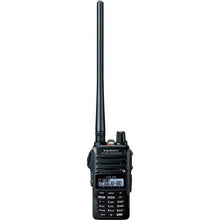
Yaesu FTA-250L Com-Only Handheld
The entry point that does not feel entry-level.
- Com-only
- 5 watt PEP transmit
- 700 mW loud speaker audio
- 250 memory channels
- IPX5 water resistance
- Li-ion battery with charger
- Compact and simple: a clean keypad and menu you can learn in one evening
- Loud front-facing speaker built for noisy ramps and airshow crowds
- 8.33 kHz narrow band channel compliance and Yaesu's 3-year waterproof warranty
Perfect for: first-time ATC listeners and student pilots who want one affordable radio that will still be useful after the checkride.
Click for Price →
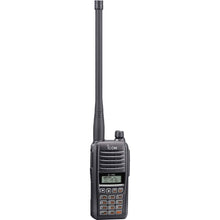
Icom IC-A16B Com-Only Handheld with Bluetooth
The rugged one you can drop in a puddle and keep listening.
- Com-only
- 6 watt PEP transmit
- 1500 mW audio output
- IP67 dust-tight and waterproof
- Bluetooth headset pairing
- Up to 17 hour battery life
- The loudest audio in its class, easily heard over ramp noise
- Bluetooth pairs with a headset or earpiece for quiet, private listening
- Built to a commercial-radio standard, ideal for airshows, fence spotting, and ground crews
Perfect for: dedicated listeners and spotters who want maximum volume, all-day battery, and a radio that shrugs off weather.
Click for Price →
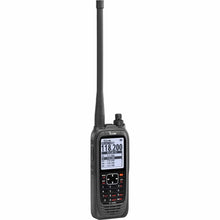
Icom IC-A25C-S Sport Com-Only Handheld
Big-screen clarity without the nav/com price.
- Com-only
- 6 watt PEP transmit
- Large 2.3 inch backlit display
- Streamlined Sport accessory package
- The big display shows frequency and channel names you can read at arm's length
- Same powerful 6 watt transmitter as Icom's flagship A25 series
- Sport package trims the accessory kit to keep the cost down
Perfect for: listeners who value a large, readable display and full Icom power without paying for navigation features.
Click for Price →
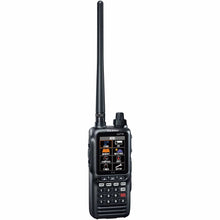
Yaesu FTA-850AA Nav/Com Handheld (AA Battery)
The backup radio that recharges at any gas station.
- Nav/Com with VOR, ILS localizer, and glide slope display
- 6 watt transmit
- Built-in 66 channel GPS receiver
- Bluetooth headset pairing
- Full-color display
- Runs on standard AA batteries
- AA power means spare batteries anywhere, a real advantage for emergency kits, and the included DC converter charges from a 12 volt aircraft outlet
- VOR, localizer, and glide slope pages plus GPS flight route navigation make it a true backup nav source
- Rugged MIL-STD-810H build rated against shock, vibration, and temperature
Perfect for: pilots building an emergency kit who want listening capability today and a GPS-equipped nav/com backup tomorrow.
Click for Price →
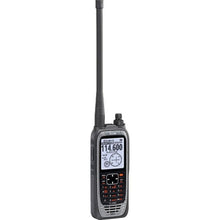
Icom IC-A25N Nav/Com Handheld with Bluetooth and GPS
The flagship: everything a handheld airband radio can do.
- Nav/Com
- 6 watt PEP transmit
- Built-in GPS with waypoint navigation
- Bluetooth
- Large 2.3 inch display
- 10 flight plans and 300 waypoints
- VOR navigation page plus GPS flight plan functions in your palm
- Bluetooth connects to headsets and to Icom's app for easy programming
- The most capable backup radio you can carry in a flight bag
Perfect for: certificated pilots and serious enthusiasts who want one do-everything handheld for listening, backup com, and backup nav.
Click for Price →Browse the full lineup in our Aviation Radios and Transceivers collection.
Related Reading
Interested in aviation communications? These guides are the logical next steps:
Frequently Asked Questions
- Can civilians legally listen to air traffic control?
- Yes. In the United States it is completely legal to listen to ATC transmissions as a civilian, whether you use a scanner, an aviation handheld, or an online stream like LiveATC. The communications are unencrypted and broadcast in the clear over VHF. What you cannot legally do is transmit on aviation frequencies without authorization, rebroadcast intercepted communications in ways that violate the Communications Act, or use what you hear for criminal purposes. A few countries treat airband listening differently, so check local law before traveling abroad with a scanner.
- What is the best handheld radio for listening to ATC?
- A com-capable aviation handheld is the best long-term choice because it doubles as a backup transmitter once you start flying. The Yaesu FTA-250L is the pick most student pilots land on: it covers the full 118.000 to 136.975 MHz airband, has loud 700 mW audio, and is simple to program. If you are certain you will only ever listen, a general-purpose scanner that receives AM in the airband also works, but it will never key up in an emergency. Buy the tool that grows with you.
- Do I need a license to listen to ATC?
- No license is required to listen to ATC in the United States. Receiving airband traffic is open to everyone. Transmitting is a different story: aviation radios operate under FCC rules covering aircraft stations, and you must be a pilot or authorized ground operator with a legitimate operational reason to transmit. Keying up on a tower frequency as a hobbyist is illegal and dangerous, and the FAA and FCC do pursue interference cases. Listen all you want, but leave the push-to-talk switch alone until you are flying.
- Why does ATC talk so fast?
- Controllers talk fast because frequency time is scarce: at a busy tower, dozens of aircraft share one channel, so every transmission is compressed into standardized phraseology. The good news is that the vocabulary is small and rigidly structured. Clearances follow predictable patterns of callsign, instruction, and readback. After a few hours of listening you will start anticipating what comes next, which is exactly why instructors tell student pilots to listen to ATC between lessons. Start at a quiet general aviation field, then work up to Class B approach frequencies as your ear improves.
- Can I listen to air traffic control on my phone for free?
- Yes. LiveATC.net streams ATC audio from volunteer-run receivers at hundreds of airports worldwide, free in a browser or through the LiveATC app. Broadcastify carries aviation feeds as well, and YouTube channels archive notable ATC recordings. The trade-offs are coverage and delay: feeds only exist where a volunteer hosts a receiver, smaller fields are often missing, and streams typically run 10 to 45 seconds behind real time. For plane spotting at the fence or following live local traffic, a radio receiving the actual VHF signal is the better tool.
- What frequencies does air traffic control use?
- Civil ATC in the U.S. operates in the VHF airband from 118.000 to 136.975 MHz, using AM rather than FM. Within that band, each facility has assigned channels: ATIS, clearance delivery, ground, tower, approach and departure, and en route center sectors. Non-towered airports use a CTAF, commonly 122.7, 122.8, or 123.0 MHz, and UNICOM often shares it. Emergency traffic uses 121.5 MHz, which is always worth a memory slot. Look up exact frequencies for your airport in the FAA Chart Supplement, on SkyVector, or on AirNav.
- Why is there a delay on LiveATC?
- Internet streaming adds buffering at every step: the volunteer receiver encodes the audio, the LiveATC servers distribute it, and your device buffers the stream before playing it. According to LiveATC's own FAQ, most listeners hear audio less than 20 seconds behind the actual transmission, though users report anywhere from 10 to 45 seconds depending on the feed and connection. That delay does not matter for casual listening or studying phraseology. It does matter if you are watching aircraft in real time, which is where a live VHF receiver wins.
- Can I transmit on an aviation handheld if I am not a pilot?
- No, not in normal circumstances. Aviation handhelds are legal to own and legal to use as receivers, but transmitting on airband frequencies requires you to be operating an aircraft station or an authorized ground station. The exception everyone should know: in a genuine emergency, anyone may use any means available to summon help, including 121.5 MHz. Outside of that, treat the transmit key as off-limits. Unauthorized transmissions on ATC frequencies endanger aircraft and carry serious federal penalties.
About the Author
Neil S. Glazer is a commercial pilot with multi-engine and instrument ratings and the founder of PilotMall.com. He has spent decades flying, listening to, and occasionally apologizing to air traffic control, and he built Pilot Mall to put trustworthy gear and honest advice in the hands of working pilots and the next generation training behind them.

1 comment
I’m just starting this hobby. I have a new Uniden Bearcat. Your article was a great read for me. It answered many of the questions I had. The information is is easily understood. Thank you for your help. Paul