




-
 SaleVendor:Logitech G
Logitech G Saitek Basic Flight Simulation Bundle w/Microsoft Flight Simulator Standard Digital Download (PC)
Regular price $389.99Sale price $389.99 Regular priceUnit price per$519.97 -
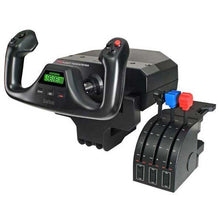 SaleVendor:Logitech G
Logitech G Saitek Pro Saitek Flight Yoke & Throttle Quadrant System (PC)
Regular price $179.99Sale price $179.99 Regular priceUnit price per$229.99 -

Fresh from The Hangar
The latest from top aviation brands. -
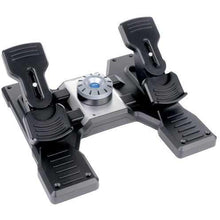 SaleVendor:Logitech G
Logitech G Saitek Pro Saitek Flight Rudder Pedals (PC)
Regular price $179.99Sale price $179.99 Regular priceUnit price per$229.99 -
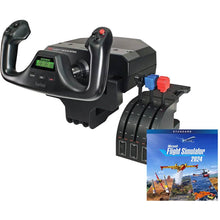 SaleVendor:Logitech G
Logitech G Saitek Pro Yoke Flight Bundle w/Microsoft Flight Simulator Standard Digital Download (PC)
Regular price $229.99Sale price $229.99 Regular priceUnit price per$289.98 -
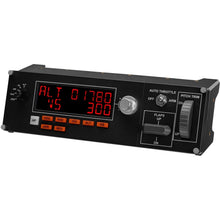 SaleVendor:Logitech G
Logitech G Saitek Pro Flight Multi Panel (PC)
Regular price $169.99Sale price $169.99 Regular priceUnit price per$199.99 -
 SaleVendor:Logitech G
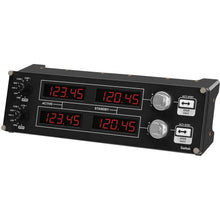
Logitech G Saitek Pro Flight Radio Panel (PC)
Regular price $169.99Sale price $169.99 Regular priceUnit price per$199.99 -
 SaleVendor:Logitech G
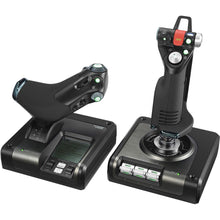
Logitech G Saitek X52 Pro H.O.T.A.S. Flight Control System (PC)
Regular price $229.99Sale price $229.99 Regular priceUnit price per$259.99 -
 Vendor:Logitech G
Logitech G Saitek Pro Flight X-56 H.O.T.A.S. System (PC)
Regular price $249.99Sale price $249.99 Regular priceUnit price per$249.99 -
 SaleVendor:Logitech G
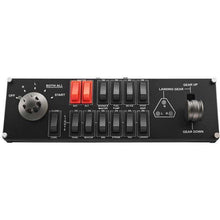
Logitech G Saitek Pro Flight Switch Panel (PC)
Regular price $119.99Sale price $119.99 Regular priceUnit price per$129.99










Logitech G (formerly Saitek) flight simulator controls turn a desktop PC into a realistic home cockpit, and choosing the right pieces comes down to the aircraft you fly and how complete you want your setup to be.
Whether you are logging practice approaches between lessons or flying for fun on the weekend, this is where most student pilots and sim enthusiasts start. The Pro Flight series of yokes, rudder pedals, and instrument panels combines realistic control feel with plug-and-play USB setup and broad compatibility with Microsoft Flight Simulator and X-Plane, all without the cost of professional-grade hardware.
Logitech G Saitek controls at a glance
| Control | Best for | What it adds |
|---|---|---|
| Pro Flight Yoke & Throttle Quadrant | General aviation, student pilots | Realistic yoke feel plus a three-lever throttle quadrant |
| Pro Flight Rudder Pedals | Coordinated turns and ground steering | Toe brakes and differential rudder for crosswind work |
| X52 Pro H.O.T.A.S. | Jets, helicopters, combat sims | Center stick and throttle for stick-first flying |
| X-56 H.O.T.A.S. | Advanced stick-and-throttle pilots | Dual-throttle HOTAS with extensive programmable inputs |
| Pro Flight Multi Panel | Autopilot and trim management | Physical autopilot, trim, and flap controls |
| Pro Flight Radio Panel | COM and NAV tuning | Dedicated frequency tuning displays and knobs |
| Pro Flight Switch Panel | Cockpit startup and systems | Magneto, gear, and lighting switches with landing-gear indicators |
Types of flight simulator controls
Yokes and rudder pedals
A yoke-based setup mirrors how most general aviation aircraft fly and is the natural starting point for student pilots practicing between lessons. Pair the Pro Flight Yoke and throttle quadrant with the Pro Flight Rudder Pedals for coordinated turns, crosswind work, and realistic ground steering.
HOTAS sticks and throttles
For jets, helicopters, and combat simulations, a hands-on-throttle-and-stick (HOTAS) setup beats a yoke. The X52 Pro and the dual-throttle X-56 put a center stick and dozens of programmable inputs at your fingertips.
Instrument and switch panels
Panels add cockpit depth without rebuilding your whole rig. The Multi Panel adds physical autopilot and trim controls, the Radio Panel handles COM and NAV frequency tuning, and the Switch Panel covers magnetos, gear, and lighting.
Ready-to-fly bundles
If you are starting from zero, our flight simulator bundles pair Logitech hardware with a Microsoft Flight Simulator download in a single box.
How to choose the right flight simulator controls
Start with the aircraft you fly most. If you train or fly general aviation aircraft, a yoke and rudder pedals will feel the most natural. If you favor fast jets or helicopters, a HOTAS stick is the better match. Decide how complete you want the cockpit to be: a yoke and pedals cover the fundamentals, while adding the Multi, Radio, and Switch panels brings you closer to a full instrument-rated practice environment. Confirm your platform too, since Logitech G Saitek controls are PC hardware for Microsoft Flight Simulator and X-Plane. For an Xbox-compatible yoke, see the Turtle Beach VelocityOne line, and for stick-first alternatives compare the Thrustmaster range. To keep panels and tablets secure on your desk, RAM mounts hold everything steady. These controls anchor our complete flight training and simulation department, and our guide to the best flight simulator yokes, pedals, and controls compares the top options side by side.
Why buy from Pilot Mall
- Aviation-only focus: we serve pilots and student pilots, not a general electronics catalog.
- Trusted for over 25 years by tens of thousands of pilots and flight enthusiasts.
- Free U.S. shipping on orders over $100.
- Expert guidance from an aviation-loving team for gear recommendations and setup help.
- Value-packed bundles that get beginners flying with everything in one box.
Frequently Asked Questions
What is a flight simulator yoke system?
A flight simulator yoke system is a desktop control that replicates the yoke and throttle of a real general aviation aircraft, giving you smooth, precise pitch and roll inputs for realistic flying. The Logitech G Saitek Pro Flight Yoke includes a three-lever throttle quadrant and connects to your PC over USB.
Are Logitech G Saitek flight simulator controls PC compatible?
Yes. Logitech G Saitek flight simulator controls are PC hardware and work with Microsoft Flight Simulator, X-Plane, and other popular PC simulators using plug-and-play USB connections.
What comes in a Logitech flight simulator bundle?
A Logitech flight simulator bundle pairs core hardware, such as the Pro Flight Yoke and throttle quadrant, with a Microsoft Flight Simulator digital download in one package, so beginners can build a complete starter cockpit without buying each piece separately.
Can flight simulator controls be used for IFR practice?
Yes. Flight simulator controls are useful for rehearsing instrument procedures, navigation, and approaches at home, although time flown on consumer simulator hardware cannot be logged toward FAA aeronautical experience requirements.
Do I need rudder pedals for flight simulation?
Rudder pedals are not strictly required, but they make a meaningful difference for coordinated turns, crosswind landings, and ground steering. Most pilots who fly general aviation aircraft add the Pro Flight Rudder Pedals to their yoke setup for the most realistic experience.
