




-
 Vendor:Logitech G
Logitech G Saitek Basic Flight Simulation Bundle w/Microsoft Flight Simulator Standard Digital Download (PC)
Complete starter bundle: yoke, throttle, rudder pedals and software, a plug-and-play USB setup with 20 aircraft and 30 airports ready to fly right out of the box.
Regular price $389.99Sale price $389.99 Regular priceUnit price per$519.97 -
 Vendor:Logitech G
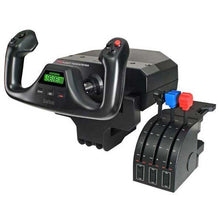
Logitech G Saitek Pro Saitek Flight Yoke & Throttle Quadrant System (PC)
Desktop yoke and throttle quadrant for realistic GA sim flying, with programmable buttons across multiple profiles that build real muscle memory for the cockpit.
Regular price $179.99Sale price $179.99 Regular priceUnit price per$229.99 -

Fresh from The Hangar
The latest from top aviation brands. -
 Vendor:Logitech G
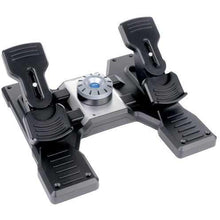
Logitech G Saitek Pro Saitek Flight Rudder Pedals (PC)
Self-centering rudder pedals with toe brakes for desktop sims, a simple USB setup compatible with Microsoft Flight Simulator, X-Plane, FSX and Prepar3D.
Regular price $179.99Sale price $179.99 Regular priceUnit price per$229.99 -
 Out of StockVendor:Logitech G
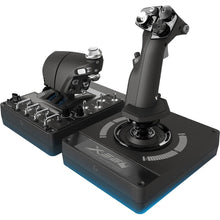
Logitech G Saitek Pro Flight X-56 H.O.T.A.S. System (PC)
Dual-throttle HOTAS with RGB lighting for immersive space sims, using 16-bit precision contact-free sensors for the most accurate control response in flight sims.
Regular price $249.99Sale price $249.99 Regular priceUnit price per$249.99 -
 Vendor:Logitech G
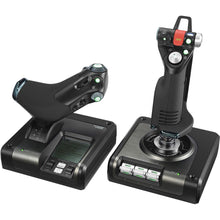
Logitech G Saitek X52 Pro H.O.T.A.S. Flight Control System (PC)
Programmable HOTAS with a multifunction display for deep control, a professional-grade PC system built for precise, realistic flight simulation control.
Regular price $229.99Sale price $229.99 Regular priceUnit price per$259.99 -
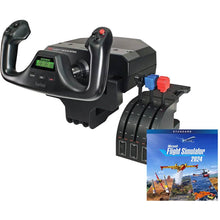 Vendor:Logitech G
Logitech G Saitek Pro Yoke Flight Bundle w/Microsoft Flight Simulator Standard Digital Download (PC)
Yoke and throttle bundle with the sim to start flying today, a plug-and-play USB setup that includes 20 aircraft ready to explore from the first flight.
Regular price $229.99Sale price $229.99 Regular priceUnit price per$289.98 -
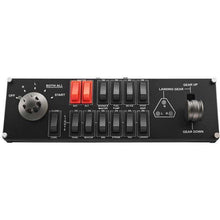 Vendor:Logitech G
Logitech G Saitek Pro Flight Switch Panel (PC)
Add-on switch and landing-gear panel for a hardware sim cockpit, delivering authentic tactile clicks and real-time LED status feedback for a realistic setup.
Regular price $119.99Sale price $119.99 Regular priceUnit price per$129.99 -
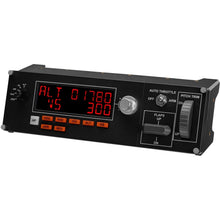 Out of StockVendor:Logitech G
Logitech G Saitek Pro Flight Multi Panel (PC)
Autopilot and trim-wheel panel to add to a hardware sim cockpit, with altitude hold, heading select and vertical speed controls plus immediate LED feedback.
Regular price $169.99Sale price $169.99 Regular priceUnit price per$199.99 -
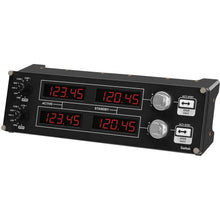 Vendor:Logitech G
Logitech G Saitek Pro Flight Radio Panel (PC)
Radio and nav frequency panel that plugs into a hardware sim cockpit, connecting via USB for real-time control in Microsoft Flight Simulator, X-Plane, and FSX.
Regular price $169.99Sale price $169.99 Regular priceUnit price per$199.99










Frequently Asked Questions
What is a flight simulator yoke system?
A flight simulator yoke system is a desktop control that replicates the yoke and throttle of a real general aviation aircraft, giving you smooth, precise pitch and roll inputs for realistic flying. The Logitech G Saitek Pro Flight Yoke includes a three-lever throttle quadrant and connects to your PC over USB.
Are Logitech G Saitek flight simulator controls PC compatible?
Yes. Logitech G Saitek flight simulator controls are PC hardware and work with Microsoft Flight Simulator, X-Plane, and other popular PC simulators using plug-and-play USB connections.
What comes in a Logitech flight simulator bundle?
A Logitech flight simulator bundle pairs core hardware, such as the Pro Flight Yoke and throttle quadrant, with a Microsoft Flight Simulator digital download in one package, so beginners can build a complete starter cockpit without buying each piece separately.
Can flight simulator controls be used for IFR practice?
Yes. Flight simulator controls are useful for rehearsing instrument procedures, navigation, and approaches at home, although time flown on consumer simulator hardware cannot be logged toward FAA aeronautical experience requirements.
Do I need rudder pedals for flight simulation?
Rudder pedals are not strictly required, but they make a meaningful difference for coordinated turns, crosswind landings, and ground steering. Most pilots who fly general aviation aircraft add the Pro Flight Rudder Pedals to their yoke setup for the most realistic experience.
No questions match your search. Try another term or ask our team.
